
Net of a Cube by Rhiannon
Loading the math board and drawing, please wait…
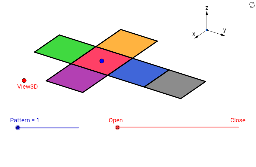
This GeoGebra example demonstrates the dynamic construction of a cube's net, unfolding the six faces of a cube into a planar cross-shaped layout within a 3D view. The core mathematical concepts involve solid geometry (cube properties), the relationship between 3D solids and their 2D nets, and geometric transformations including translation, reflection, and orthogonal projection. Construction highlights: using GeoGebra commands such as Vector, Translate, OrthogonalLine, Polygon, Midpoint, Segment, and Mirror to build vertices, edges, and faces, while parameters like sinphi, cosphi, sintheta, costheta control the 3D view rotation for the unfolding animation. Suitable for middle and high school mathematics lessons on solid geometry, helping students visualize the six possible nets of a cube and enhance spatial reasoning skills.
GeoGebra Commands & Parameters
Vector(B_1, Z) → wVector(B_1, Y) → vVector(B_1, X) → uTranslate(A, Vector[(2 * v)]) → A'Translate(P, Vector[(2 * v)]) → P'OrthogonalLine(View3D, yAxis) → a_1OrthogonalLine(View3D, xAxis) → b_1Polygon(L, K, N, M) → poly1, l, k_1, n, mPolygon(K, P, Q, N) → poly2, k_2, p, q, n_1Polygon(L, M, S, R) → poly3, l_1, m_1, s, rPolygon(N, V, W, M) → poly4, n_2, v_1, w_1, m_2Polygon(K, T, U, L) → poly5, k_3, t, u_1, l_2Polygon(B, Q, P, A) → poly6, b_2, q_1, p_1, a_2Midpoint(R, M) → DTranslate(S, Vector[(-((2 * v)))]) → S'Segment(S, C) → eTranslate(M, Vector[(-2 * v)]) → M'Segment(M, E) → fSegment(E, C) → hTranslate(N, Vector[(-2 * v)]) → N'Translate(Q, Vector[(-2 * v)]) → Q'_1Segment(Q, F) → iSegment(N, G) → jSegment(G, F) → d_1Translate(Q, Vector[(-2 * v)]) → Q'_2Translate(B, Vector[(-2 * v)]) → B'_1Segment(B, I) → e_1Segment(I, H) → f_1Segment(H, Q) → g_1Translate(K, Vector[(2 * v)]) → K'Translate(P, Vector[(2 * v)]) → P'_1Segment(P, J) → h_1Segment(J, A_1) → i_1Segment(A_1, K) → j_1Segment(B, H_1) → s_1Segment(H_1, C_1) → cSegment(C_1, A) → r_1Midpoint(N, P) → D_1Midpoint(k_1) → F_1Segment(A, G_1) → t_1Segment(G_1, I_1) → c_2Segment(I_1, P) → d_2Segment(J, K_1) → f_2Segment(P, L_1) → e_2Segment(L_1, K_1) → g_2Segment(M, W) → h_2Mirror(L_1, F_1) → O_1Mirror(K_1, F_1) → P_1Segment(M, M_1) → i_2Segment(N_1, J_1) → j_2Segment(J_1, M_1) → p_2Polygon(M, E, C, S) → poly7, q_2, r_2, s_2, t_2Polygon(Q, N, G, F) → poly8, q_3, n_3, g_3, f_3Polygon(B, Q, H, I) → poly9, b_3, q_4, h_3, i_3Polygon(J, A_1, K, P) → poly10, j_3, a_3, k_4, p_3Polygon(C_1, A, B, H_1) → poly11, c_3, a_4, b_4, h_4Polygon(G_1, I_1, P, A) → poly12, g_4, i_4, p_4, a_5Polygon(K_1, J, P, L_1) → poly13, k_5, j_4, p_5, l_3Polygon(M, M_1, J_1, N_1) → poly14, m_3, m_4, j_5, n_4
AI Drawing Prompt Reference
Create a 3D animation of a cube unfolding into its net. Start with a cube composed of six polygonal faces, arranged symmetrically around a central point. Use vector translations and mirror reflections to unfold the faces into a flat cross-shaped layout, preserving the connecting edges between faces. Control the viewing angle with orthogonal projections and rotation parameters to animate the unfolding process. The figure includes multiple vertices, edges, and faces, along with auxiliary segments and symmetric points, ultimately displaying the complete planar net of the cube's six faces.
The prompt above was compiled from the original drawing commands and is for reference only.