
Net of a Cube by Pamela Cortes
Loading the math board and drawing, please wait…
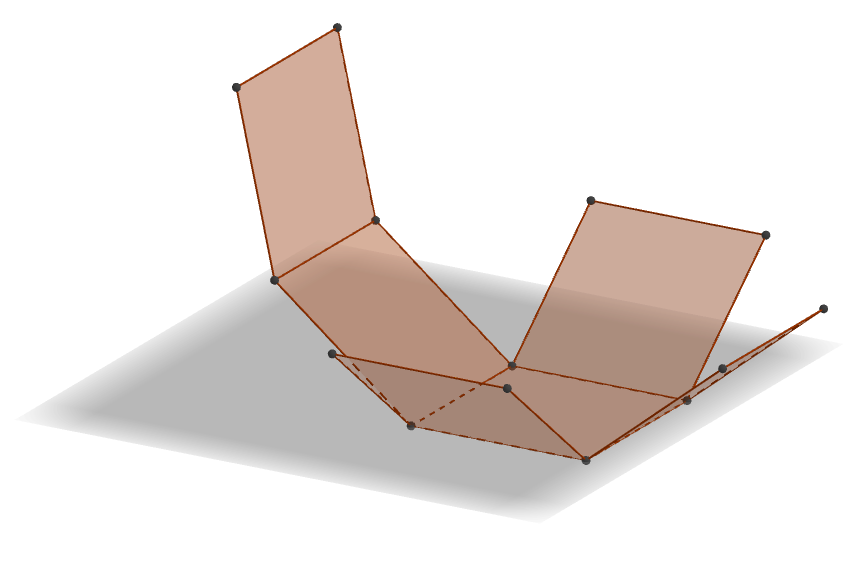
① This example demonstrates how a cube unfolds into a flat net of six square faces, showing the correspondence between a 3D solid and its 2D development. ② The core mathematical concepts include solid geometry, the structure of a cube, the topological relationships between faces and edges, and the construction and recognition of nets. ③ Construction highlights: using GeoGebra's Cube command to generate the cube, Intersect and Point commands to define key vertices, and the Net command to unfold the six faces (faceABCD, faceADHE, faceABFE, faceBCGF, faceCDHG, faceEFGH) onto the plane while preserving edge correspondences (edgeAD, edgeAB, etc.), resulting in a foldable net. ④ Suitable for upper elementary to middle school students to understand the transformation between 3D shapes and 2D nets, and for developing spatial visualization skills in mathematics education.
GeoGebra Commands & Parameters
Intersect(zAxis, xAxis) → APoint(xAxis) → BPoint(Circle[B, Distance[A, B], Segment[A, B]]) → CCube(A, B, C) → a, D, faceCDHG, faceEFGH, edgeAD, edgeAB, edgeBC, edgeCD, edgeAE, edgeDH, edgeEH, edgeEF, E, edgeBF, edgeFG, edgeCG, edgeGH, F, G, H, faceABCD, faceADHE, faceABFE, faceBCGFNet(a, b) → c, I, R, S, T, U, V, faceIJKL, faceILNM, faceIJRQ, faceJKTS, faceKLVU, J, faceMNOP, edgeIL, edgeIJ, edgeJK, edgeKL, edgeLN, edgeMN, edgeIM, edgeIQ, edgeQR, K, edgeJR, edgeJS, edgeST, edgeKT, edgeKU, edgeUV, edgeLV, edgeNO, edgeOP, edgeMP, L, M, N, O, P, Q
AI Drawing Prompt Reference
Draw the net of a cube showing how six square faces unfold into a flat shape, labeling the vertices and edges to maintain correspondence. Start by constructing the cube, then unfold it into six connected squares while preserving the relationships between edges.
The prompt above was compiled from the original drawing commands and is for reference only.