
Net of a cone: Radius constant
Loading the math board and drawing, please wait…
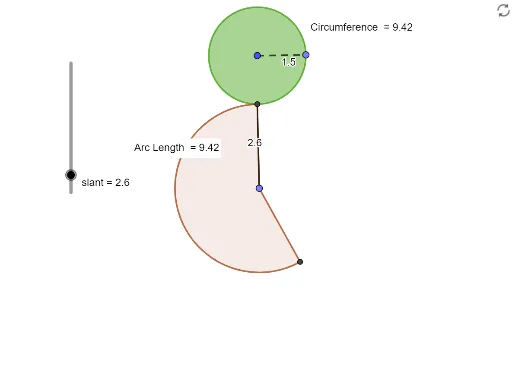
This example demonstrates the net of a cone with a constant radius. It involves core mathematical concepts such as cone, tangent function, random variables, polynomial functions, rational numbers, and combinatorics. The construction uses commands and objects like Point, Segment, Circle, Tangent, OrthogonalLine, Intersect, Circumference, PointIn, Rotate, Angle, CircleSector, Distance, and Length in GeoGebra. Suitable for high school students learning solid geometry and coordinate geometry.
GeoGebra Commands & Parameters
Point(Circle[A, radius]) → BSegment(A, B) → rCircle(A, B) → cPoint(c) → CTangent(C, c) → f,OrthogonalLine(C, f) → gPoint(Circle[C, slant]) → DSegment(C, D) → hIntersect(c, h, 1) → ECircle(D, E) → dCircumference(c) → circumferencecPointIn(c) → PointcRotate(D, ((360 * r / h))°, C) → D'Rotate(E, ((360 * r / h))°, D) → E'Angle(E, D, E') → αCircleSector(D, E, E') → eDistance(E, E') → distanceEE'Length(e) → aPointIn(e) → Pointe
AI Drawing Prompt Reference
Draw the net of a cone with a constant base radius. Start by creating a circle and a radius line from the center to the circumference. Then draw a new circle using the radius as the diameter. From a point on this new circle, draw a tangent line and a perpendicular line. Next, draw a circle with the slant height as the radius, intersecting the perpendicular line at a point. Use this point to draw another circle that intersects the base circle. Finally, rotate the slant line by a certain angle to form the sector part of the cone's net.
The prompt above was compiled from the original drawing commands and is for reference only.