
Nested Triangle Similarity Problem
Loading the math board and drawing, please wait…
In collections
Properties of Polygons
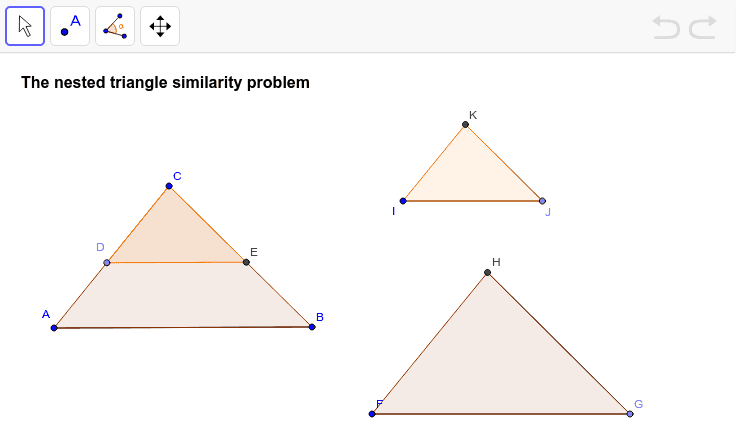
This example demonstrates the problem of nested similar triangles, involving the core concept of similar triangles. Using GeoGebra commands such as Segment, Polygon, Point, Line, Intersect, Angle, Rotate, Circle, students can explore this figure. Suitable for middle school and above students for geometric construction and learning about similar triangles.
GeoGebra Commands & Parameters
Segment(A, B) → aPolygon(A, B, C) → poly1, c, a_1, bPoint(b) → DLine(D, a) → dIntersect(d, a_1) → EPolygon(C, D, E) → poly2, e, c_1, d_1Segment(A_1, B_1) → a_2Point(Circle[F, abs(a)]) → GSegment(F, G) → fAngle(B, A, C) → αRotate(G, α, F) → G'Angle(G, F, G') → βLine(F, G') → gCircle(F, Segment[A, C]) → hIntersect(h, g, 2) → HSegment(H, G) → iPolygon(F, G, H) → poly3, h_1, f_1, g_1Point(Circle[I, abs(c_1)]) → JSegment(I, J) → jRotate(J, α, I) → J'Angle(J, I, J') → γLine(I, J') → kCircle(I, Segment[D, C]) → pIntersect(p, k, 2) → KSegment(K, J) → lPolygon(I, J, K) → poly4, k_1, i_1, j_1
AI Drawing Prompt Reference
Draw a figure with four nested similar triangles. Start by drawing triangle ABC, then take point D on side BC and draw a line through D parallel to AB, intersecting AC at E to form triangle CDE. Next, rotate triangle CDE around point A to form new triangle AFG. Then, rotate triangle AFG around point F to form triangle FGH. Finally, rotate triangle FGH around point G to form triangle GHI.
The prompt above was compiled from the original drawing commands and is for reference only.