
Nested Polygons Example
Loading the math board and drawing, please wait…
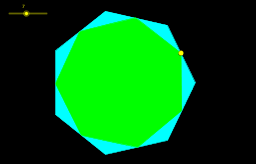
This example demonstrates the construction and properties of complex geometric figures formed by nesting multiple polygons. It involves core mathematical concepts such as polygon construction, geometric transformations, vector operations, and definite integrals. The construction utilizes GeoGebra commands like Circle, Intersect, Segment, Sequence, Polygon, Point, Angle, Vector, Distance, and Ray. It is suitable for high school and above students to explore geometric construction techniques and polygonal properties.
GeoGebra Commands & Parameters
Circle(A, 4) → cIntersect(c, xAxis, 2) → BSegment(B, C) → a_2Sequence(((4 * cos(a)), (4 * sin(a))), a, 0, (2 * π), (2 * π / n)) → list1Polygon(B, C, n) → poly1, a, k, l, m, p, q, r, s, t, b_1, c_1, b, d_1, D, E, F, G, H, I, J, K, L, d, M, N, O, P, Q, R, T, U, V, e, f, g, h, i, jPoint(a_2) → SSegment(A, S) → a_1Angle(B, A, S) → αVector(A, S) → uSequence(Vector[Rotate[u, ((2 * π) * k / n)]], k, 1, n) → u'Distance(B, S) → BSDistance(B, C) → BCSequence(Segment[Rotate[A, ((2 * π) * k / n)], Rotate[S, ((2 * π) * k / n)]], k, 1, n, 1) → list2Sequence(Vector[A, Element[list1, k]], k, 1, n, 1) → list3Distance(C, D) → CDRay(A, Vector[Element[u', 1]]) → e_1Intersect(e_1, b) → WPolygon(S, W, n) → poly2, f_1, p_1, q_1, r_1, s_1, t_1, b_2, c_2, d_2, e_2, f_2, g_1, g_2, Z, A_1, B_1, C_1, D_1, E_1, F_1, G_1, H_1, h_1, I_1, J_1, K_1, L_1, M_1, N_1, O_1, P_1, Q_1, i_1, j_1, k_1, l_1, m_1, n_1