
Negative Numbers Pyramid Calculation
Loading the math board and drawing, please wait…
In collections
Module 1: Negative numbers
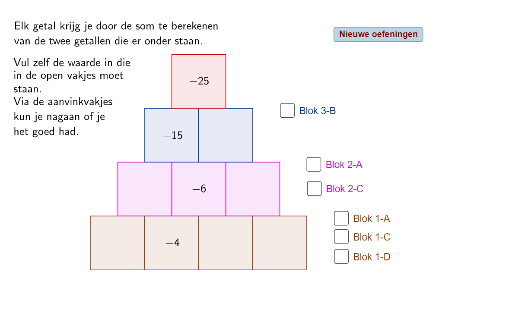
This example demonstrates the calculation involving negative numbers in a pyramid shape. It covers core math concepts like negative number operations, polygon construction, and solid geometry. The construction uses GeoGebra commands/objects such as Intersect, Point, Polygon, and Random. Suitable for middle school students and above learning negative number operations and geometric figure construction.
GeoGebra Commands & Parameters
Intersect(xAxis, yAxis) → APoint(xAxis) → BPolygon(A, B, 4) → veelhoek1, a, b, c, d, C, DPoint(xAxis) → EPolygon(B, E, 4) → veelhoek2, b_1, e, f, g, F, GPoint(xAxis) → HPolygon(E, H, 4) → veelhoek3, e_1, h, i, j, I, JPoint(xAxis) → KPolygon(H, K, 4) → veelhoek4, h_1, k, l, m, L, MPoint(c) → NPoint(f) → OPolygon(N, O, 4) → veelhoek5, n, o, p, q, P, QPoint(i) → RPolygon(O, R, 4) → veelhoek6, o_1, r, s, t, S, TPoint(l) → UPolygon(R, U, 4) → veelhoek7, r_1, u, a_1, c_1, V, WPoint(p) → ZPoint(s) → A_1Polygon(Z, A_1, 4) → veelhoek8, z, a_2, d_1, f_1, B_1, C_1Point(a_1) → D_1Polygon(A_1, D_1, 4) → veelhoek9, a_3, d_2, g_1, i_1, E_1, F_1Point(d_1) → G_1Point(g_1) → H_1Polygon(G_1, H_1, 4) → veelhoek10, g_2, h_2, j_1, k_1, I_1, J_1Random(-15, 10) → vRandom(-15, 5) → wRandom(-20, 10) → l_1Random(-20, -5) → m_1
AI Drawing Prompt Reference
Draw a pyramid composed of stacked squares, with the base formed by two line segments on the x-axis at different positions. Each layer above is a square, progressively smaller, with some vertices lying on the x-axis. Use randomly generated negative and positive numbers as part of the side lengths, making the pyramid's shape irregular, with some sides having negative lengths to demonstrate negative number operations.
The prompt above was compiled from the original drawing commands and is for reference only.