
Naming Points, Lines, and Planes in 3D
Loading the math board and drawing, please wait…
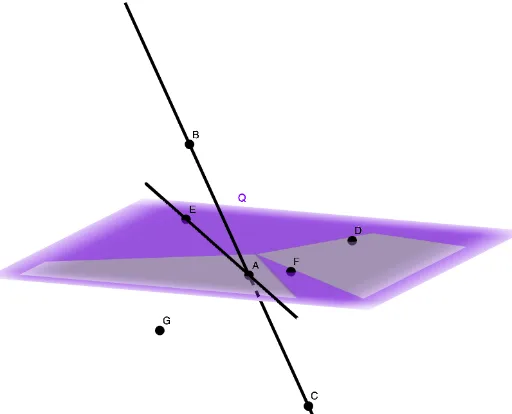
This example demonstrates how to consistently name and organize basic 3D geometry objects—points, lines, and planes—and how to verify spatial membership relationships. It highlights key concepts such as three-dimensional geometric primitives (Point, Line, Plane) and incidence (e.g., whether a point lies in a plane). Construction-wise, it uses the GeoGebra commands Line and Plane to create the line and plane objects, and then PointIn to build a membership test for points relative to a plane. The setup relies on the explicit object naming (points like A, B, C and multiple labeled points such as D, E, F, G, Q, H), alongside plane identifiers such as f and g, to make the relationship between labels and geometry visually and logically traceable. Suitable for middle and high school students learning solid geometry, and for learners using GeoGebra to practice geometric construction and object linking.
GeoGebra Commands & Parameters
Line(C, A) → fPlane(E, D, F) → QLine(A, E) → gPointIn(Q) → H
AI Drawing Prompt Reference
In 3D space, place three non-collinear pointsais, then draw a line through two of them. Use the remaining three points to define a plane. Next, construct a second line from one of the first points to a point outside the plane, ensuring it intersects the plane. Finally, pick a point on the plane to show it lies within the plane. Label all points and planes clearly, and illustrate the incidence relationships between points and the plane.
The prompt above was compiled from the original drawing commands and is for reference only.