
Mystic Rose and Handshakes: Exploring Patterns and Combinatorics
Loading the math board and drawing, please wait…
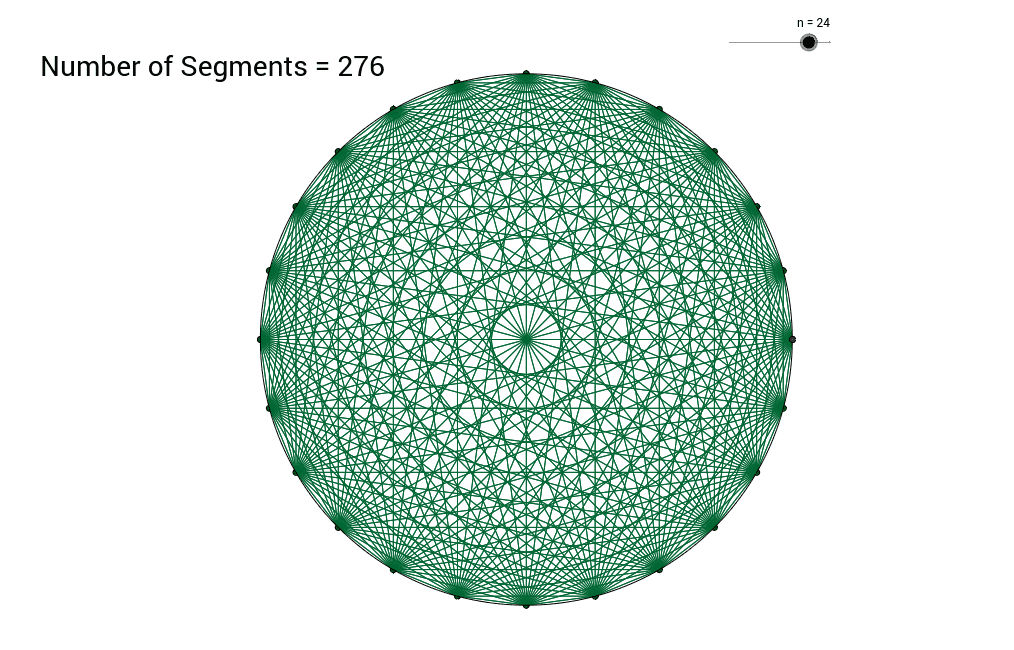
①This example constructs a Mystic Rose—a star-like figure formed by connecting equally spaced points on a circle—and illustrates the handshake problem, counting pairwise interactions among n points.
②Key mathematical ideas include combinatorial counting (n choose 2), quadratic sequences, geometric transformations, symmetry, and the relationship between algebraic formulas and visual patterns.
③The GeoGebra construction uses commands Intersect, Point, Circle, and Sequence to generate points A and B, create chords via intersection, store coordinates in lists list1 and list2, control the number of points with a Number slider n, and display the handshake count in text1.
④Designed for high‑school students studying combinatorics, sequences, and geometry, and useful for teachers seeking a dynamic illustration of algebraic and geometric reasoning.
GeoGebra Commands & Parameters
Intersect(xAxis, yAxis) → APoint(xAxis) → BCircle(A, B) → cSequence(Rotate[B, 360° * i / n], i, 0, n) → list1Sequence(Sequence[Segment[Element[list1, i], Element[list1, j]], j, 0, n], i, 0, n) → list2
AI Drawing Prompt Reference
Draw a circle with a controllable radius, then place n equally spaced points on its circumference where n is set by a slider. Connect every pair of points with straight chords to create the mystic rose star pattern. Display the handshake count, which equals the binomial coefficient C(n,2), as a text label on the figure. The construction proceeds by first defining the center and radius, then generating the points, then drawing all chords, and finally showing the count.
The prompt above was compiled from the original drawing commands and is for reference only.