
Creating Parabolas with Lines and Patterns
Loading the math board and drawing, please wait…
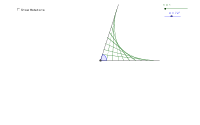
This example demonstrates how to construct parabolas and create patterns using straight lines. It involves core mathematical concepts like Straight Lines, Parabola, Vectors, Surface, Median Value, Cone, Integers. The construction utilizes GeoGebra commands such as Rotate, Angle, Segment, Sequence, Intersect, Mirror, and Line, with objects like A, B, α, A', β, a, b, c, n, x_dis, and multiple lists. It is suitable for high school and above students to understand geometric constructions of parabolas and pattern generation.
GeoGebra Commands & Parameters
Rotate(A, α, B) → A'Angle(A, B, A') → βSegment(A', B) → aSegment(B, A) → bSequence(x = x_dis * i / 10, i, 1, 10 * n) → list1Sequence(Intersect[Element[list1, i], a], i, 1, 10 * n) → list2Sequence(x = (b * i) / (10 * n), i, 1, 10 * n) → list3Sequence(Intersect[Element[list3, i], b], i, 1, 10 * n) → list4Sequence(Segment[Element[list2, i], Element[list4, 10 * n - i]], i, 0, 10 * n) → list5Sequence((0, (10 * i) / (10 * n)), i, 1, 10 * n) → list6Sequence(Segment[Element[list6, i], Element[list4, 10 * n - i]], i, 0, 10 * n) → list7Intersect(a, b) → CMirror(B, f) → B'Mirror(A, f) → A'_1Mirror(A', f) → A''Mirror(B, f) → B'_1Line(A', b) → gMirror(A', g) → A''_1Mirror(B, g) → B'_2Mirror(A'', g) → A'''Mirror(B'_1, g) → DMirror(B', g) → B''Mirror(A'_1, g) → EMirror(B, g) → B'_3Mirror(A, g) → A'_2Intersect(f, g) → FMirror(list7, a) → list7'Mirror(list7, b) → list7'_1Line(C, b) → iMirror(list7', i) → list7''Sequence(Rotate[list5, α * i], i, 1, d) → list8
AI Drawing Prompt Reference
Draw two intersecting lines to form an angle, use rotation and reflection to generate a series of parallel lines, and plot parabolas using the intersections of these lines. Combine multiple symmetrical operations and rotations to create complex geometric patterns, demonstrating the relationship between straight lines and parabolas.
The prompt above was compiled from the original drawing commands and is for reference only.