
Multiplying Mixed Numbers by Paul Walter
Loading the math board and drawing, please wait…
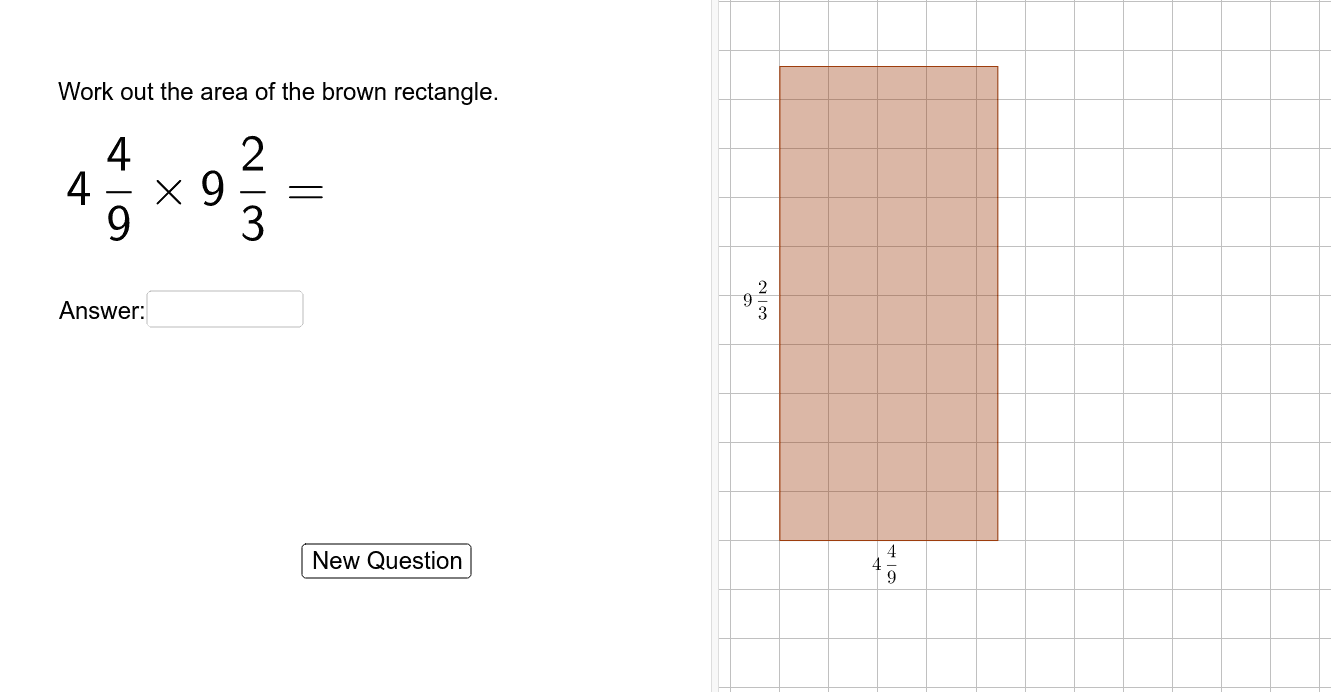
This example demonstrates how to multiply mixed numbers using GeoGebra. Key mathematical concepts include fraction multiplication. Using commands like Random, Textfield, Vector, and Translate, users can dynamically input and manipulate mixed numbers to observe the multiplication process. Suitable for upper elementary and middle school students learning fraction operations.
GeoGebra Commands & Parameters
Random(1, 10) → dRandom(1, 10) → bRandom(1, (10 * b)) → aRandom(1, (10 * d)) → cmieszany(a, b) → firstFracmieszany(c, d) → secondFracTextfield(answerText) → InputBox1mieszany((a * c), (b * d)) → correctAnswerCorner(calculation, 3) → ansStartPosIndexOf("\", Text[correctAnswer]) → CAposBackslashIndexOf("}", Text[correctAnswer]) → CAposDenomTake(Text[correctAnswer], CAposBackslash + 6, CAposDenom - 1) → CAtextNumTake(Text[correctAnswer], CAposDenom + 2, Length[Text[correctAnswer]] - 2) → CAtextDenIndexOf(" ", Text[correctAnswer]) → CAposSpaceIf(Defined[CAposSpace], If[CAposSpace ≟ 1, "", Take[Text[correctAnswer], 1, CAposSpace]], Text[correctAnswer]) → CAtextIntIf(Defined[CAposSpace], CAtextInt + CAtextNum + "/" + CAtextDen, CAtextInt) → CAasTextIndexOf(" ", answerText) → AspacePosIndexOf("/", answerText) → AslashPosDefined(AspacePos) → AhasSpaceDefined(AslashPos) → AhasSlashIf(AhasSpace, Take[answerText, 1, AspacePos - 1], If[AhasSlash, "0", answerText]) → AtextIntPolygon((0, 0), (floor(a / b), 0), (floor(a / b), floor(c / d)), (0, floor(c / d))) → poly1, g, h, i, jPolygon((0, 0), (ceil(a / b), 0), (ceil(a / b), ceil(c / d)), (0, ceil(c / d))) → poly2, e, f, k, lPolygon((0, 0), (a / b, 0), (a / b, c / d), (0, c / d)) → poly3, n, p, q, rMidpoint(n) → firstFracPosMidpoint(r) → secFracPosIf(AhasSlash, If[AhasSpace, Take[answerText, AspacePos + 1, AslashPos - 1], Take[answerText, 1, AslashPos - 1]], "0") → AtextNumIf(AhasSlash, Take[answerText, AslashPos + 1, Length[answerText]], "1") → AtextDenVector(Corner[text4, 1], Corner[text4, 4]) → leftPosVector(Corner[text4, 3], Corner[text4, 4]) → leftPos2Translate(secFracPos, Vector[leftPos / 2 + leftPos2]) → modifiedPosVector(Corner[text3, 2], Corner[text3, 1]) → vTranslate(firstFracPos, Vector[v / 2]) → firstFracPos'
AI Drawing Prompt Reference
Create a dynamic illustration showing the multiplication of two mixed numbers. Display two randomly generated mixed numbers as rectangles, with distinct colors for integer and fractional parts. Calculate and visualize their product with a different color. Include a text box for inputting the answer, and dynamically update the display of the correct answer to match the calculation and the visual representation.
The prompt above was compiled from the original drawing commands and is for reference only.