
Multiplication Wheel by stuart.cork
Loading the math board and drawing, please wait…
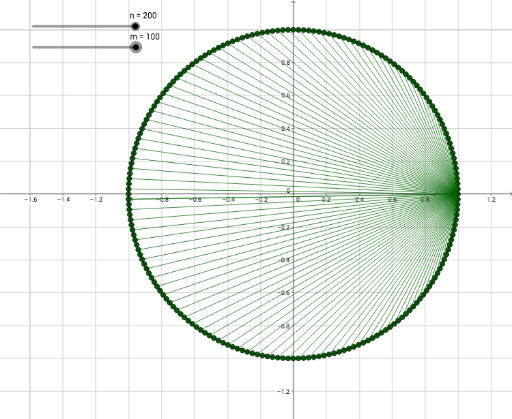
This example demonstrates a dynamic multiplication wheel, visually representing multiplication tables through rotation and interaction. Core math concepts include multiplication, circle, trigonometry, sequence, and coordinate geometry. It is constructed using GeoGebra's Circle and Sequence commands, creating dynamically changing circles and sequences. Suitable for middle school and above students to learn multiplication, trigonometry, and geometric constructions, ideal for mathematical education and visualization.
GeoGebra Commands & Parameters
Circle((0, 0), 1) → cSequence(Rotate[(-1, 0), ((360° * i)) / n, (0, 0)], i, 1, n + 1, 1) → list1Sequence(Segment[list1(i), list1(Mod[(m * i), n])], i, 1, n + 1, 1) → list2
AI Drawing Prompt Reference
Draw a dynamic multiplication wheel: start with a unit circle centered at the origin. Place equally spaced points around the circumference, beginning from the leftmost point, and number them sequentially. From each point, draw a line segment to another point whose index is the product of the current index and a fixed multiplier, taken modulo the total number of points. This creates a set of intersecting chords that visually reveal multiplication patterns. The figure consists of the circle, the points on it, and the connecting segments, which change as the multiplier varies, producing a rotational symmetric design.
The prompt above was compiled from the original drawing commands and is for reference only.