
Multiplication of Two Numbers Using Circles: A Visual Geometric Method
Loading the math board and drawing, please wait…
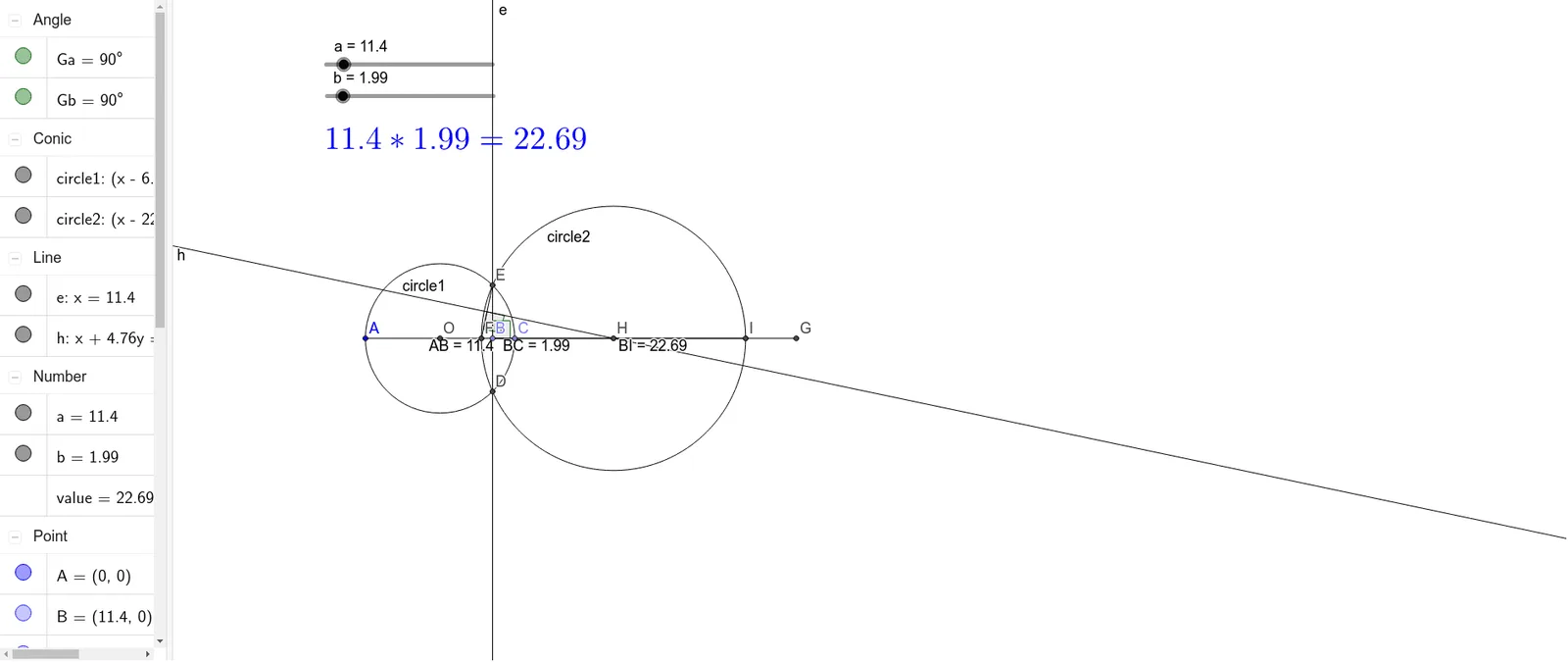
① This GeoGebra example demonstrates a novel way to multiply two numbers by drawing circles and counting intersection points, turning arithmetic multiplication into a visual geometric construction. ② The core mathematical concepts involve multiplication, geometric construction, and the relationship between number operations and circle-line intersections, incorporating elements like points, segments, midpoints, perpendicular lines, and angles. ③ Construction details: Based on the summary, the example uses GeoGebra commands such as Point, Segment, Midpoint, Circle, OrthogonalLine, Angle, Intersect, and LineBisector, with objects including a, b, A, B, AB, C, BC, O, circle1, e, Ga, D, E, F, EF, G, CG, h, Gb, H, circle2, I, BI, value, and text1, enabling dynamic interaction and real-time visualization. ④ This resource is suitable for middle school students (around grades 7-8) learning multiplication concepts, introductory geometric construction, or for teachers to demonstrate in class and for students to explore independently, fostering a deeper understanding of how multiplication can be represented geometrically.
GeoGebra Commands & Parameters
Point(Circle[A, a]) → BSegment(A, B) → ABPoint(Circle[B, b]) → CSegment(B, C) → BCMidpoint(A, C) → OCircle(O, Segment[A, O]) → circle1OrthogonalLine(B, Segment[B, C]) → eAngle(Segment[A, C], e) → GaIntersect(circle1, e) → D, ESegment(E, F) → EFSegment(C, G) → CGLineBisector(Segment[E, F]) → hAngle(EF, h) → GbIntersect(h, Segment[F, G]) → HCircle(H, Segment[H, E]) → circle2Intersect(circle2, Segment[H, G]) → I,Segment(B, I) → BI
AI Drawing Prompt Reference
Draw two circles: one centered at a point with a radius equal to the first number, and another centered at the intersection of the first circle and a line with a radius equal to the second number. Connect the centers, find the midpoint, and draw a circle. Draw a line through the intersection points, find intersections with the circle, and use these points to draw auxiliary lines and circles, ultimately locating the intersection points of the two circles to visualize the multiplication result.
The prompt above was compiled from the original drawing commands and is for reference only.