
Multiplication Lattice Method Dynamic Demonstration
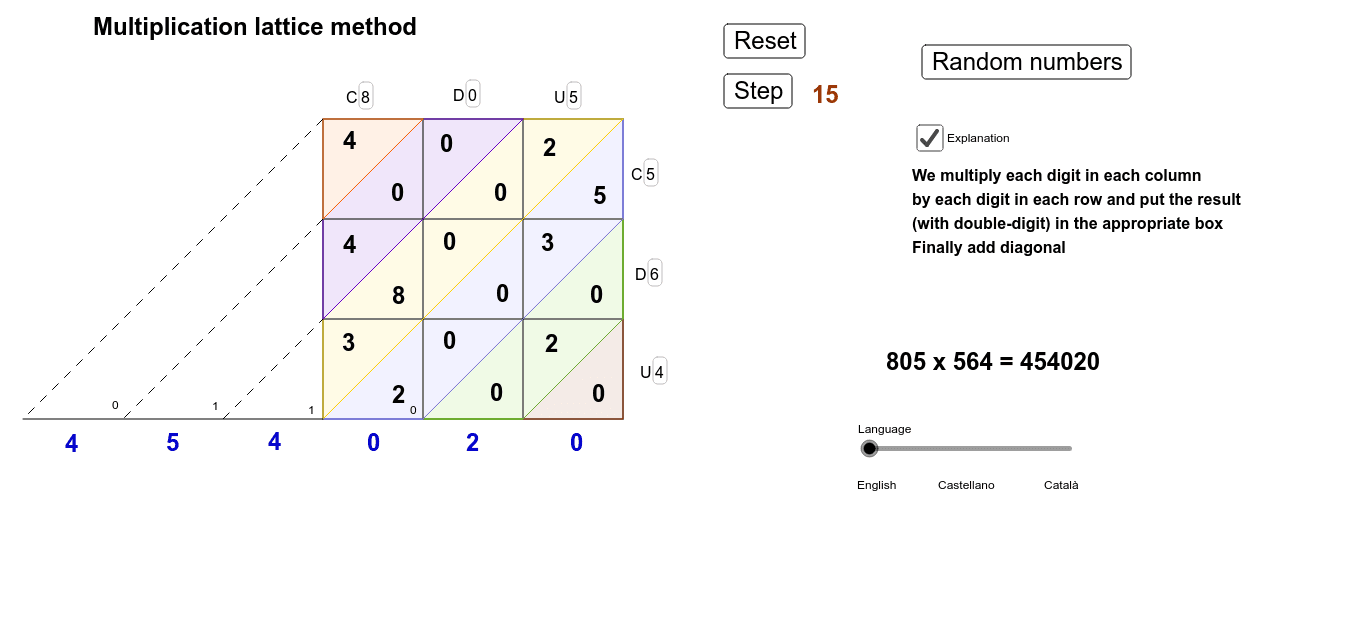
Loading the math board and drawing, please wait…
① This GeoGebra example dynamically illustrates the lattice method for multiplication, showing step-by-step how products of individual digits are placed in a grid and summed along diagonals. ② The core mathematical concepts include place value decomposition, carrying in integer multiplication, and the use of modulo (Mod) and integer division (Div) to split numbers into digits. ③ Construction highlights: The commands Div and Mod are used to extract each digit of the multiplicands; Segment and Polygon create the lattice grid; Textfield allows user input; numerous objects (e.g., bu, bd, bc, au, UUd, UDu, UDd, UCd, UCu, ad, DUu, decenes, acarreod, DUd, DDd, DDu, DCu, DCd, ac, CUd, CUu, centenes, acarreoc, CDu, milers, acarreom, CDd, CCd, CCu, dmilers, acarreodm, cmilers) track partial products and carries, updating dynamically to show the full calculation. ④ This resource is ideal for upper elementary or middle school students learning multi-digit multiplication, and for teachers demonstrating the reasoning behind the standard algorithm, enhancing number sense and logical thinking.
GeoGebra Commands & Parameters
Div((au * bu), 10) → UUdMod((au * bd), 10) → UDuDiv((au * bd), 10) → UDdDiv((au * bc), 10) → UCdMod((au * bc), 10) → UCuMod((ad * bu), 10) → DUuDiv(decenes, 10) → acarreodDiv((ad * bu), 10) → DUdDiv((ad * bd), 10) → DDdMod((ad * bd), 10) → DDuMod((ad * bc), 10) → DCuDiv((ad * bc), 10) → DCdDiv((ac * bu), 10) → CUdMod((ac * bu), 10) → CUuDiv(centenes, 10) → acarreocMod((ac * bd), 10) → CDuDiv(milers, 10) → acarreomDiv((ac * bd), 10) → CDdDiv((ac * bc), 10) → CCdMod((ac * bc), 10) → CCuDiv(dmilers, 10) → acarreodmSegment(A, B) → aSegment(A, C) → bSegment(C, D) → cSegment(D, B) → dPoint(a) → EPoint(c) → FSegment(E, F) → ePoint(b) → GPoint(d) → HSegment(G, H) → fSegment(E, G) → iPoint(a) → IPoint(c) → JSegment(I, J) → gPoint(b) → KPoint(d) → LSegment(K, L) → hSegment(L, J) → jSegment(H, F) → kSegment(B, C) → lSegment(I, K) → mTextfield(ac) → CasillaDeEntrada1Textfield(ad) → CasillaDeEntrada2Textfield(au) → CasillaDeEntrada3Textfield(bc) → CasillaDeEntrada4Textfield(bd) → CasillaDeEntrada5Textfield(bu) → CasillaDeEntrada6Mod((au * bu), 10) → UUuPolygon(L, J, D) → polígono1, d_1, l_1, j_1Polygon(H, F, J, L) → polígono2, h_1, f_1, j_2, l_2Polygon(C, F, H, B) → polígono3, c_1, f_2, h_2, b_1Polygon(I, K, C, B) → polígono4, i_1, k_1, c_2, b_2Polygon(G, K, I, E) → polígono5, g_1, k_2, i_2, e_1Polygon(A, G, E) → polígono6, e_2, a_1, g_2Segment(G, N) → pSegment(A, O) → qSegment(O, C) → rMod(decenes, 10) → decenesuMod(centenes, 10) → centenesuMod(milers, 10) → milersuMod(dmilers, 10) → dmilersuMod(cmilers, 10) → cmilersuSegment(M, K) → s
AI Drawing Prompt Reference
Create a dynamic educational diagram illustrating the lattice method for multiplication. The figure consists of a rectangular grid formed by intersecting horizontal and vertical line segments, with several text input boxes placed within the grid for entering digits of two three-digit numbers. At each intersection or cell, the products of individual digits are displayed as tens and ones, with diagonal line segments connecting relevant positions to show carrying and summation. The overall layout is a clear table structure, where numbers and lines update dynamically to demonstrate step-by-step multiplication.
The prompt above was compiled from the original drawing commands and is for reference only.