
Multiplication Array by Steve Ouellette
Loading the math board and drawing, please wait…
In collections
Order of Operations
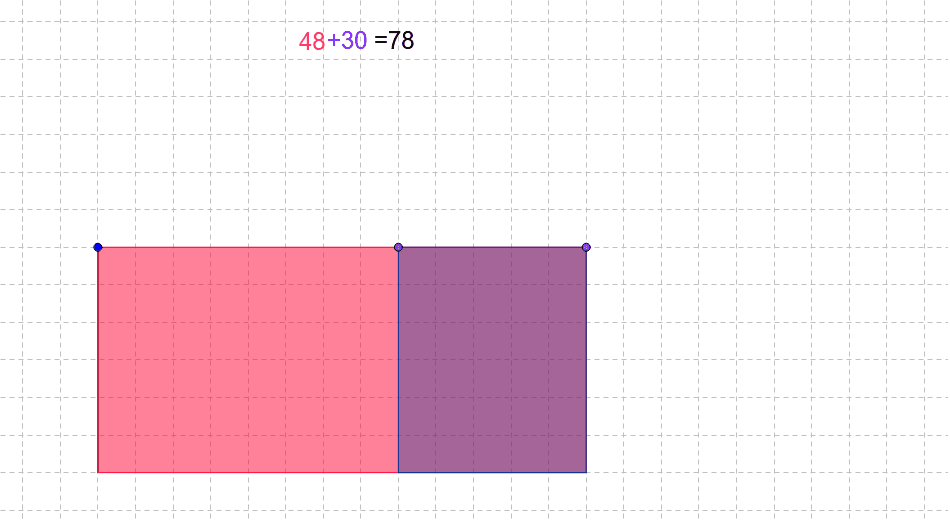
This example dynamically demonstrates the concept of a multiplication array, visually linking multiplication with geometric figures. It involves core math concepts like multiplication, LCM and GCD, functions, planes, and circumcircle. GeoGebra commands such as Line, Intersect, Segment, Point, OrthogonalLine, Polygon, and Distance are used in its construction. Suitable for middle school and above students to understand the connection between multiplication and geometry visually.
GeoGebra Commands & Parameters
Line(A, xAxis) → aLine(A, yAxis) → bLine(B, a) → dIntersect(b, d) → CSegment(A, C) → cPoint(a) → DOrthogonalLine(D, a) → eIntersect(d, e) → EPolygon(A, D, E, C) → poly1, a_1, d_1, e_1, c_1Point(a_1) → FOrthogonalLine(F, a_1) → fIntersect(f, d) → GPolygon(F, D, E, G) → poly2, f_1, d_2, e_2, gDistance(A, C) → distanceACDistance(A, F) → distanceAFDistance(F, D) → distanceFD
AI Drawing Prompt Reference
Draw a dynamic illustration of a multiplication array concept, visually linking multiplication with geometric figures. Include a coordinate system with two axes and geometric shapes formed by their intersections with line segments. Start by drawing two axes, then draw lines from a point to each axis, intersecting another line to form a point. Construct a quadrilateral using this point and the origin, then another point on the x-axis. Draw a perpendicular line from this point, intersecting the previous line to get another point, and form another quadrilateral. Finally, label the distances between key points to demonstrate the connection between multiplication and geometry.
The prompt above was compiled from the original drawing commands and is for reference only.