
Multiple Integrals Example in Spherical Coordinates
Loading the math board and drawing, please wait…
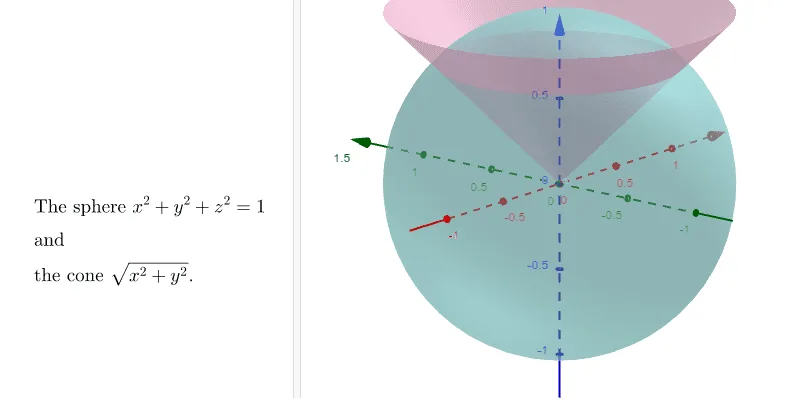
This example demonstrates the application of multiple integrals using spherical coordinates. It shows how to calculate the volume of a specific region in 3D space using spherical coordinates. The Surface command is used to construct the 3D graph. Suitable for teaching multiple integrals in calculus courses.
GeoGebra Commands & Parameters
Surface(((a_2 * sin(ϕ)) * cos(θ)), ((a_2 * sin(ϕ)) * sin(θ)), (a_2 * cos(ϕ)), θ, 0, (b1 * π), ϕ, 0, (c1 * π)) → a_1Surface(((t * sin((c1 * π))) * cos(θ)), ((t * sin((c1 * π))) * sin(θ)), (t * cos((c1 * π))), θ, 0, (b1 * π), t, 0, a_2) → b_1Surface((ρ * sin(ϕ)), ((ρ * sin(ϕ)) * 0), (ρ * cos(ϕ)), ρ, 0, a_2, ϕ, 0, (c1 * π)) → dSurface(((ρ * sin(ϕ)) * cos((b1 * π))), ((ρ * sin(ϕ)) * sin((b1 * π))), (ρ * cos(ϕ)), ρ, 0, a_2, ϕ, 0, (c1 * π)) → e
AI Drawing Prompt Reference
Draw a 3D graph demonstrating the application of multiple integrals in spherical coordinates, showing how to calculate the volume of a specific region. Start by plotting a surface defined by spherical coordinates, then add another surface for the integral's limits, followed by a conical surface, and finally a rotating surface. The combined surfaces form a complex solid figure suitable for teaching integral calculations.
The prompt above was compiled from the original drawing commands and is for reference only.