
Multi-stage Animation Geometric Construction Example
Loading the math board and drawing, please wait…
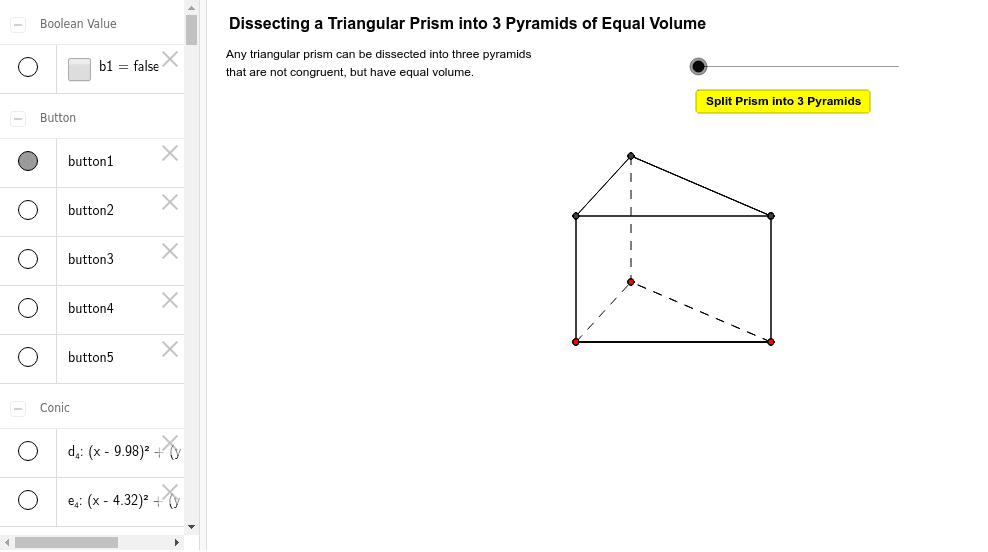
This example demonstrates a multi-stage animation showing geometric transformations. Key mathematical concepts include prisms, volume calculations, quadratic functions, Pythagorean theorem, and logarithms. Construction involves GeoGebra commands like If, Vector, Translate, Line, Point, OrthogonalLine, Segment, Polygon, and Circle. Suitable for middle school students and above to understand geometric transformations and function graphs.
GeoGebra Commands & Parameters
If(o < 1, o, 1) → o1Vector(A, E) → qIf(o1 < 0.2, Vector[(0 * q)], Vector[If[o1 < 0.8, Vector[(((5 / 3 * o1) - 1 / 3) * q)], q]]) → q1Translate(A, q1) → A'Vector(A', A) → mIf(k1 < 1, Vector[(k1 * m)], Vector[If[k1 < 4, m, Vector[((5 - k1) * m)]]]) → m1Translate(A', m1) → A''Line(A, B_1) → aPoint(a) → BVector(A, C) → uOrthogonalLine(A, a) → bPoint(b) → DVector(A, B) → vVector(A, D) → wTranslate(C, w) → C'Vector(C, C') → cTranslate(B, w) → B'Vector(B, B') → dSegment(C, B) → eSegment(C', B') → fSegment(D, B') → gSegment(D, C') → hSegment(A, C) → iSegment(D, A) → jSegment(C', C) → k_2Segment(B', B) → l_2Segment(C', A) → m_2Segment(A, B') → n_2Segment(B', C) → p_2Vector(A, G) → sIf(o < 1, 0, o - 1) → o2If(o2 < 0.2, Vector[(0 * s)], Vector[If[o2 < 0.8, Vector[(((5 / 3 * o2) - 1 / 3) * s)], s]]) → s1Translate(D, q1) → D'Translate(C', q1) → C''Translate(B', q1) → B''Segment(C'', B'') → tSegment(B'', D') → a_1Segment(A', B'') → b_1Segment(C'', A') → c_1Segment(A', D') → d_1Segment(D', C'') → e_1Translate(A, s1) → A'_1Translate(C, s1) → C'_1Translate(B, s1) → B'_1Translate(B', s1) → B''_1Segment(A'_1, B'_1) → rSegment(B'_1, C'_1) → f_1Segment(C'_1, A'_1) → g_1Segment(B''_1, B'_1) → h_1Segment(B''_1, C'_1) → i_1Segment(B''_1, A'_1) → j_1Segment(C', D) → k_1Segment(D, A) → l_1Segment(D, B') → m_1Segment(B, A) → n_1Segment(B, B') → p_1Segment(B, C) → q_1Vector(A'_1, A) → nPoint(n) → FVector(F, A') → pIf(k2 < 1, Vector[(k2 * n)], Vector[If[k2 < 4, n, Vector[((5 - k2) * n)]]]) → n1If(k3 < 1, Vector[(k3 * p)], Vector[If[k3 < 4, p, Vector[((5 - k3) * p)]]]) → p1Polygon(C'', D', H) → poly1, h_2, c'', d'Polygon(C', A, C) → poly2, c_2, c', a_2Translate(C'', m1) → C'''Translate(D', m1) → D''Translate(H, m1) → H'Polygon(C''', D'', H') → poly1', h', c''', d''Translate(C'', m1) → C'''_1Translate(B'', m1) → B'''Segment(C'''_1, B''') → t'Translate(B'', m1) → B'''_1Translate(D', m1) → D''_1Segment(B'''_1, D''_1) → kTranslate(B'', m1) → B'''_2Segment(A'', B'''_2) → lTranslate(C'', m1) → C'''_2Translate(A', m1) → A''_1Segment(C'''_2, A''_1) → r_1Translate(A', m1) → A''_2Translate(D', m1) → D''_2Segment(A''_2, D''_2) → s_1Translate(D', m1) → D''_3Translate(C'', m1) → C'''_3Segment(D''_3, C'''_3) → t_1Polygon(C', C, B') → poly3, b', c'_1, c_3Polygon(C'_1, B'_1, B''_1) → poly4, b''_1, c'_2, b'_1Translate(C'_1, n1) → ITranslate(B'_1, n1) → JTranslate(B''_1, n1) → KPolygon(I, J, K) → poly4', k_3, i_2, j_2Translate(A'_1, n1) → LTranslate(B'_1, n1) → MSegment(L, M) → r'Translate(B'_1, n1) → NTranslate(C'_1, n1) → OSegment(N, O) → b_2Translate(C'_1, n1) → PTranslate(A'_1, n1) → QSegment(P, Q) → d_2Translate(B''_1, n1) → RTranslate(B'_1, n1) → SSegment(R, S) → e_2Translate(B''_1, n1) → TTranslate(C'_1, n1) → USegment(T, U) → f_2Translate(B''_1, n1) → VTranslate(A'_1, n1) → WSegment(V, W) → g_2Translate(F, n1) → F'Polygon(C''', D'', B''') → poly5, b''', c'''_1, d''_1Polygon(I, F, J) → poly6, j_3, i_3, f_3Translate(I, p1) → I'Translate(F, p1) → F'_1Translate(J, p1) → J'Polygon(I', F'_1, J') → poly6', j', i', f'_1Translate(A'_1, p1) → ZTranslate(B'_1, p1) → A_1Segment(Z, A_1) → r'_1Translate(B'_1, p1) → C_1Translate(C'_1, p1) → D_1Segment(C_1, D_1) → q_2Translate(C'_1, p1) → E_1Translate(A'_1, p1) → F_1Segment(E_1, F_1) → r_2Translate(B''_1, p1) → G_1Translate(B'_1, p1) → H_1Segment(G_1, H_1) → s_2Translate(B''_1, p1) → I_1Translate(C'_1, p1) → J_1Segment(I_1, J_1) → t_2Translate(B''_1, p1) → K_1Translate(A'_1, p1) → L_1Segment(K_1, L_1) → a_3Translate(K, p1) → K'Translate(I, p1) → I'_1Segment(K', I'_1) → b_3Translate(J, p1) → J'_1Translate(K, p1) → K'_1Segment(J'_1, K'_1) → d_3Translate(L, p1) → L'Translate(M, p1) → M'Segment(L', M') → r''Translate(N, p1) → N'Translate(O, p1) → O'Segment(N', O') → e_3Translate(P, p1) → P'Translate(Q, p1) → Q'Segment(P', Q') → g_3Translate(R, p1) → R'Translate(S, p1) → S'Segment(R', S') → h_3Translate(T, p1) → T'Translate(U, p1) → U'Segment(T', U') → l_3Translate(V, p1) → V'Translate(W, p1) → W'Segment(V', W') → m_3Translate(F', p1) → F''Segment(G_1, J') → n_3Segment(D'', H) → p_3Polygon(H, B''', C''') → poly7, c'''_2, h_4, b'''_1Polygon(F, K, C') → poly8, c'_3, f_4, k_4Polygon(F, K, I) → poly9, i_4, f_5, k_5Polygon(A, B', C) → poly10, c_4, a_4, b'_2Segment(I', F'_1) → q_3Segment(I', J') → r_3Segment(G_1, J') → s_3Segment(G_1, I') → t_3Circle(B''', 0.3) → d_4Circle(A, 0.3) → e_4
AI Drawing Prompt Reference
Draw a multi‑stage animated triangular prism: start with a base triangle, translate it along a vector to create a top triangle and connect corresponding vertices to form the lateral edges. Add two sliders; the first drives a gradual translation of the whole prism along one direction, the second drives a piecewise translation along another direction, so the prism expands and then retracts in two successive phases, illustrating volume change, Pythagorean relations, and a quadratic trajectory.
The prompt above was compiled from the original drawing commands and is for reference only.