
Moss Egg: Symmetric Egg-Shaped Curve Construction
Loading the math board and drawing, please wait…
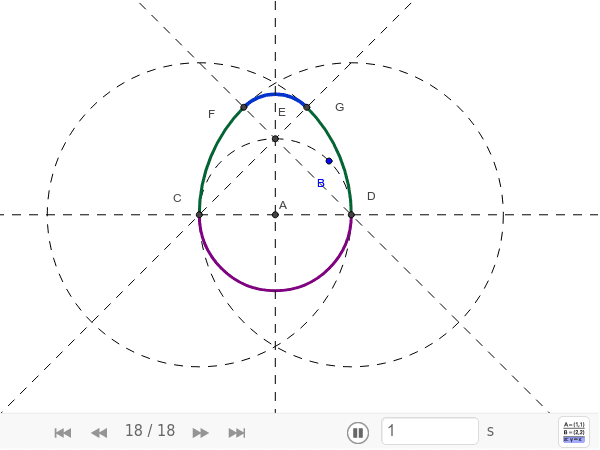
This GeoGebra example demonstrates the geometric construction of the Moss Egg, a symmetric egg-shaped closed curve featured in Robert Dixon's Mathographics (Dover Edition, 1987). The construction involves core mathematical concepts including circle geometry, circular arcs, straight lines, intersection points, isosceles triangles, coordinate geometry, and symmetry. Based on the construction summary, it uses GeoGebra commands Intersect, Circle, Line, and CircleArc, together with objects such as points A, B, a, c, b, C, D, d, e, E, f, g, F, G, h, k, p, q, to generate the egg outline through circle-line intersections and circular-arc joining. It is suitable for high school and undergraduate geometry teaching, mathematical art exploration, and dynamic geometry demonstrations.
GeoGebra Commands & Parameters
Intersect(xAxis, yAxis) → AIntersect(c, b, 1) → CIntersect(c, b, 2) → DCircle(D, C) → dCircle(C, D) → eIntersect(c, a, 1) → ELine(D, E) → fLine(C, E) → gIntersect(d, f, 2) → FIntersect(e, g, 2) → GCircleArc(E, G, F) → hCircleArc(C, D, G) → kCircleArc(D, F, C) → pCircleArc(A, C, D) → q
AI Drawing Prompt Reference
Draw a symmetric egg‑shaped closed curve (Moss Egg) by first constructing two intersecting circles to get two intersection points; then draw circles centered at each intersection passing through the other; next draw a line through one intersection and the intersection of the first circle with a third circle, and a symmetric line through the other intersection; find the second intersections of these lines with the new circles; finally join the four key points with four circular arcs in sequence to form the complete egg outline.
The prompt above was compiled from the original drawing commands and is for reference only.