
Monkey Saddle Surface Construction with Parametric Curves
Loading the math board and drawing, please wait…
In collections
geometriadinamica.es
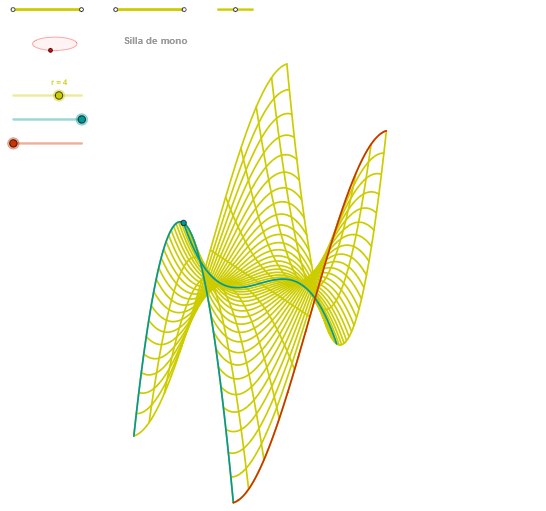
This example demonstrates how to construct a monkey saddle surface (Silla de mono) using multiple parametric curves in GeoGebra. The core mathematical concepts involve parametric equations, surface construction, and curve transformations. Construction points: Define parametric curves using the CurveCartesian command, generate curve sequences with Sequence, construct ellipse and rotated angles using Ellipse and Angle commands, then apply OrthogonalLine and Intersect to complete the curve network. This example is suitable for advanced mathematics, analytic geometry, or differential geometry courses, helping students understand parametric surface construction methods and surface characteristics.
GeoGebra Commands & Parameters
Segment(Q3, Q4) → p2Point(p2) → P3Segment(P3, Q4) → p4Point(p4) → P4Segment(Q1, Q2) → p1Point(p1) → P1Segment(P1, Q2) → p3Point(p3) → P2OrthogonalLine(C, yAxis) → zz1Circle(C, 0.62) → zz0Intersect(zz0, zz1, 1) → ZZ1Intersect(zz0, zz1, 2) → ZZ2Ellipse(ZZ1, ZZ2, 0.65) → zElipse1Intersect(zElipse1, zz1) → ZZ5, ZZ6Point(zElipse1) → XYAngle(ZZ6, C, XY) → zAngRotOrthogonalLine(C, xAxis) → zz2Intersect(zz0, zz2, 2) → ZZ3Intersect(zz0, zz2, 1) → ZZ4Ellipse(ZZ3, ZZ4, 0.65) → zElipse2Intersect(zElipse2, zz2) → ZZ7, ZZ8Point(zElipse2) → ZAngle(ZZ8, C, Z) → zAngIncSegment(Q5, Q6) → p5Point(p5) → P5CurveCartesian(((r / 1.5 * u) * sin(zAngRot)), (r / 1.5 * ((((-u) * cos(zAngRot)) * sin(zAngInc)) + (u^(3) * cos(zAngInc)))), u, u1, u2) → curva1Segment(ZZ5, ZZ6) → zz4Segment(ZZ7, ZZ8) → zz3Intersect(zElipse2, zElipse1, 1) → zPunto1Intersect(zElipse2, zElipse1, 4) → zPunto2Segment(zPunto1, zPunto2) → zSeg2CurveCartesian((r / 1.5 * ((α * sin(zAngRot)) + (v * cos(zAngRot)))), (r / 1.5 * ((((-α) * cos(zAngRot)) * sin(zAngInc)) + ((v * sin(zAngRot)) * sin(zAngInc)) + ((α^(3) - ((3 * α) * v^(2))) * cos(zAngInc)))), v, v1, v2) → curva2CurveCartesian((r / 1.5 * ((u * sin(zAngRot)) + (β * cos(zAngRot)))), (r / 1.5 * ((((-u) * cos(zAngRot)) * sin(zAngInc)) + ((β * sin(zAngRot)) * sin(zAngInc)) + ((u^(3) - ((3 * u) * β^(2))) * cos(zAngInc)))), u, u1, u2) → aSequence(CurveCartesian[(r / 1.5 * ((u * sin(zAngRot)) + (v * cos(zAngRot)))), (r / 1.5 * ((((-u) * cos(zAngRot)) * sin(zAngInc)) + ((v * sin(zAngRot)) * sin(zAngInc)) + ((u^(3) - ((3 * u) * v^(2))) * cos(zAngInc)))), u, u1, u2], v, v1, v2, paso) → list2Sequence(CurveCartesian[(r / 1.5 * ((u * sin(zAngRot)) + (v * cos(zAngRot)))), (r / 1.5 * ((((-u) * cos(zAngRot)) * sin(zAngInc)) + ((v * sin(zAngRot)) * sin(zAngInc)) + ((u^(3) - ((3 * u) * v^(2))) * cos(zAngInc)))), v, v1, v2], u, u1, u2, (4 * paso)) → list1
AI Drawing Prompt Reference
To draw a monkey saddle surface, first construct two ellipses and a rotation angle. Steps include defining ellipses, calculating their intersection points, then determining the rotation angle via orthogonal lines. Next, use these ellipses and angles to generate parametric curve sequences, combining them with sequence functions to form the surface. Key objects are ellipses, rotation angles, and parametric curves, connected through intersections and orthogonal relationships, resulting in a surface with specific curvature.
The prompt above was compiled from the original drawing commands and is for reference only.