
Mondrian Style Geometric Construction
Loading the math board and drawing, please wait…
In collections
Paintings modeled in Geogebra
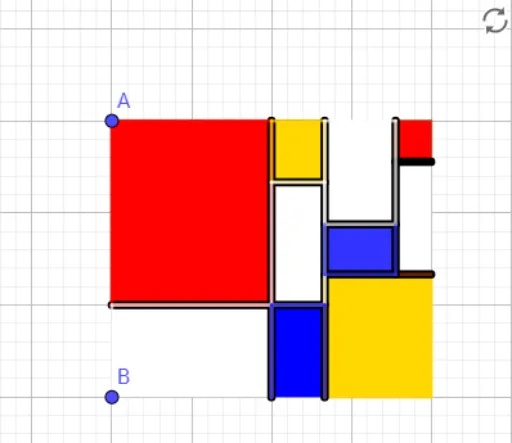
This example demonstrates a Mondrian-style artwork through geometric construction. It involves core concepts of geometric construction such as points, line segments, polygons, and transformations. Using GeoGebra commands like Segment, OrthogonalLine, Polygon, and Dilate, users can create geometric figures in the Mondrian style. Suitable for high school mathematics education and the intersection of art and mathematics.
GeoGebra Commands & Parameters
Segment(A, B) → fOrthogonalLine(A, f) → gPoint(g) → COrthogonalLine(C, g) → hOrthogonalLine(B, f) → iIntersect(h, i) → DPolygon(A, C, D, B) → q1, a, c, d, bMidpoint(A, C) → EPolygon(E, A, 4) → poly1, j, k, l, m, F, GMidpoint(B, D) → HPolygon(H, G, F, B) → q2, h_1, g_1, f_1, b_1Dilate(D, 1 / 3, H) → D'Dilate(E, 2 / 3, C) → E'Segment(E', D') → nDilate(E', 1 / 3, D') → E''Polygon(G, E'', D', H) → q3, g_2, e'', d', h_2Dilate(E, 2 / 3, G) → E'_1Polygon(E, E'_1, 4) → poly2, p, q, r, s, I, JPolygon(D', D, 4) → poly3, t, e, i_1, j_1, K, LDilate(E', 1 / 3, C) → E''_1Dilate(L, 1 / 3, K) → L'Polygon(E''_1, C, K, L') → q4, e''_1, c_1, k_1, l'Polygon(C, E''_1, 4) → poly4, l_1, m_1, n_1, p_1, M, NDilate(L', 5 / 9, M) → L''OrthogonalLine(L'', l') → q_1Intersect(q_1, n) → OPolygon(L, O, L'', L') → q5, l_2, o, l'', l'_1Polygon(I, E'', G, E'_1) → q6, i_2, e''_2, g_3, e'_1Polygon(E', E''_1, L'', O) → q7, e', e''_3, l''_1, o_1Polygon(O, L'', L', L) → q8, o_2, l''_2, l'_2, l_3Polygon(A, E, G, F) → q9, a_1, e_1, g_4, f_2Polygon(F, G, H, B) → q10, f_3, g_5, h_3, b_2Polygon(E, E', I, E'_1) → q11, e_2, e'_2, i_3, e'_3Polygon(E'_1, I, E'', G) → q12, e'_4, i_4, e''_4, g_6Polygon(G, E'', D', H) → q13, g_7, e''_5, d'_1, h_4Intersect(n, o) → PPolygon(E', E''_1, L'', P) → q14, e'_5, e''_6, l''_3, p_2Polygon(P, L'', L', L) → q15, p_3, l''_4, l'_3, l_4Polygon(L, K, D, D') → q16, l_5, k_2, d_1, d'_2Polygon(E''_1, C, N, M) → q17, e''_7, c_2, n_2, m_2Polygon(M, N, K, L') → q18, m_3, n_3, k_3, l'_4
AI Drawing Prompt Reference
Create a Mondrian-style geometric design with multiple squares and rectangles, constructed using points, line segments, and polygons, with symmetry and scaling transformations. Start by drawing line segment AB, then construct a line g perpendicular to AB, and take point C on g. Next, draw lines h and i perpendicular to f and g, respectively, and find intersection point D. Use this as one vertex of the polygon ABCD. Continue with multiple symmetry and scaling transformations to build the complex geometric design.
The prompt above was compiled from the original drawing commands and is for reference only.