
Moebius Transformation: MD Circle with Spherical Projection
Loading the math board and drawing, please wait…
In collections
Mapping Diagrams to Visualize Complex Analysis
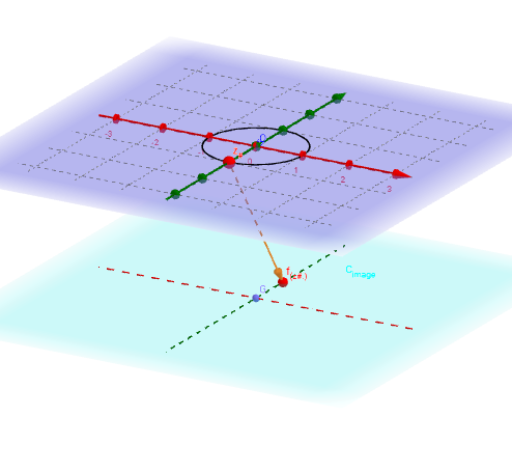
This example demonstrates the Möbius transformation of a circle with spherical projection, highlighting geometric transformations and spherical geometry. Key math concepts include complex function transformations, trigonometry, and coordinate geometry. Constructed using GeoGebra commands like Sequence, Zip, CurveCartesian, Vector, Textfield, Intersect, Sphere, Ray, Point, and Locus. Suitable for high school and advanced learners exploring the intersection of complex analysis and geometric projections.
GeoGebra Commands & Parameters
Sequence((r * cos(t)) + x(O) + ((y(O) + (r * sin(t))) * ί), t, -3.14159, π, (2 * π / n)) → z_*Zip(fz(z), z, z_*) → fz_1Sequence((x(Element[fz_1, k]), y(Element[fz_1, k]), ht), k, 1, n) → fz_*CurveCartesian((r * cos(t)), (r * sin(t)), ht, t, 0, 6.283185307179586) → d_1Vector(z_#, f_{(z#.)}) → wTextfield(f_{(z#)}) → inputBox2CurveCartesian(t, 0, ht, t, -5, 5) → XhCurveCartesian(0, t, ht, t, -5, 5) → YhTextfield(z_*) → inputBox3Intersect(xAxis, yAxis) → BSphere(A, B) → fVector(C, z_#) → uRay(C, z_#) → gIntersect(g, f) → D, ESphere(F, G) → hIntersect(zAxis, h, 1) → HVector(f_{(z#.)}, H) → vRay(f_{(z#.)}, H) → iIntersect(i, h) → I, JTextfield(Fz) → inputBox1Sequence(Vector[Element[fz_*, j], (0, 0, -5)], j, 1, n) → ProjVectfz_*Sequence(Vector[(0, 0, 2), Element[z_*, j]], j, 1, n) → ProjVectz_*Sequence(Intersect[Ray[Element[fz_*, j], (0, 0, -5)], h], j, 1, n) → Projfz_*Sequence(Intersect[Line[Element[z_*, j], (0, 0, 2)], f], j, 1, n) → Projz_*Sequence(Vector[Element[z_*, j], Element[fz_*, j]], j, 1, n) → fvec_*Vector(f_{(z#.)}, H) → kPoint(C_O) → KLocus(PfzK, K) → loc1
AI Drawing Prompt Reference
Draw a circle after Möbius transformation and show its spherical projection. Start by drawing a circle, then apply the Möbius transformation, and display the transformed circle on the sphere. Finally, draw the projection of the transformed circle on the sphere and mark key points and vectors.
The prompt above was compiled from the original drawing commands and is for reference only.