
Midpoints (7)
Loading the math board and drawing, please wait…
In collections
geometriadinamica.es
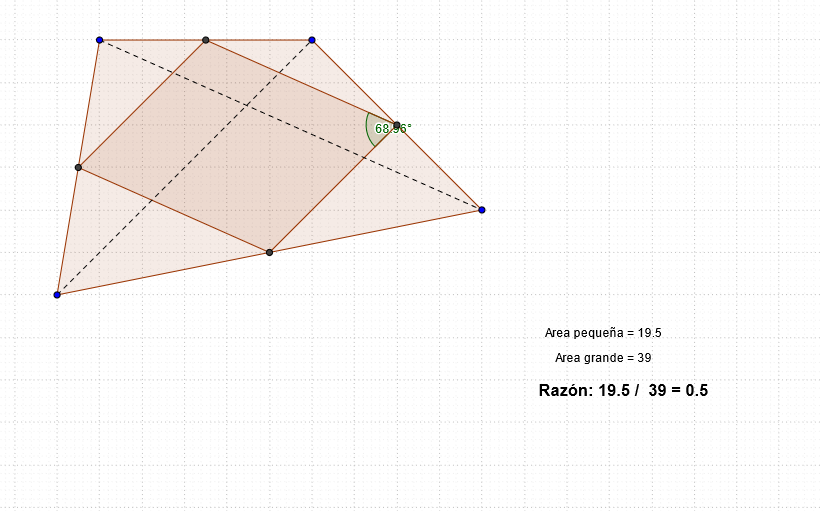
This example demonstrates how to use GeoGebra to draw midpoints. A midpoint is the point that divides a line segment into two equal parts. This example involves core math concepts in geometry and coordinate geometry. The construction points out the use of Polygon, Midpoint, Segment, and Angle GeoGebra commands. This example is suitable for middle school or high school students learning about midpoints and their applications.
GeoGebra Commands & Parameters
Polygon(A, B, C, D) → poly1, a, b, c, dMidpoint(d) → EMidpoint(c) → FMidpoint(b) → GMidpoint(a) → HPolygon(E, F, G, H) → poly2, e, f, g, hSegment(B, D) → iSegment(A, C) → jAngle(E, F, G) → α
AI Drawing Prompt Reference
Draw a quadrilateral in the plane with vertices labeled A, B, C, and D. Find the midpoints that split the relevant sides: take the midpoint of segment BD to get E, the midpoint of segment CA to get F, the midpoint of segment DC to get G, and the midpoint of segment AB to get H. Connect E, F, G, and H to form a second quadrilateral. Also draw segment BD and segment AC. Finally, define an angle using points E, F, and G, indicating angle EFG.
The prompt above was compiled from the original drawing commands and is for reference only.