
Midpoint and Length of Line Segment
Loading the math board and drawing, please wait…
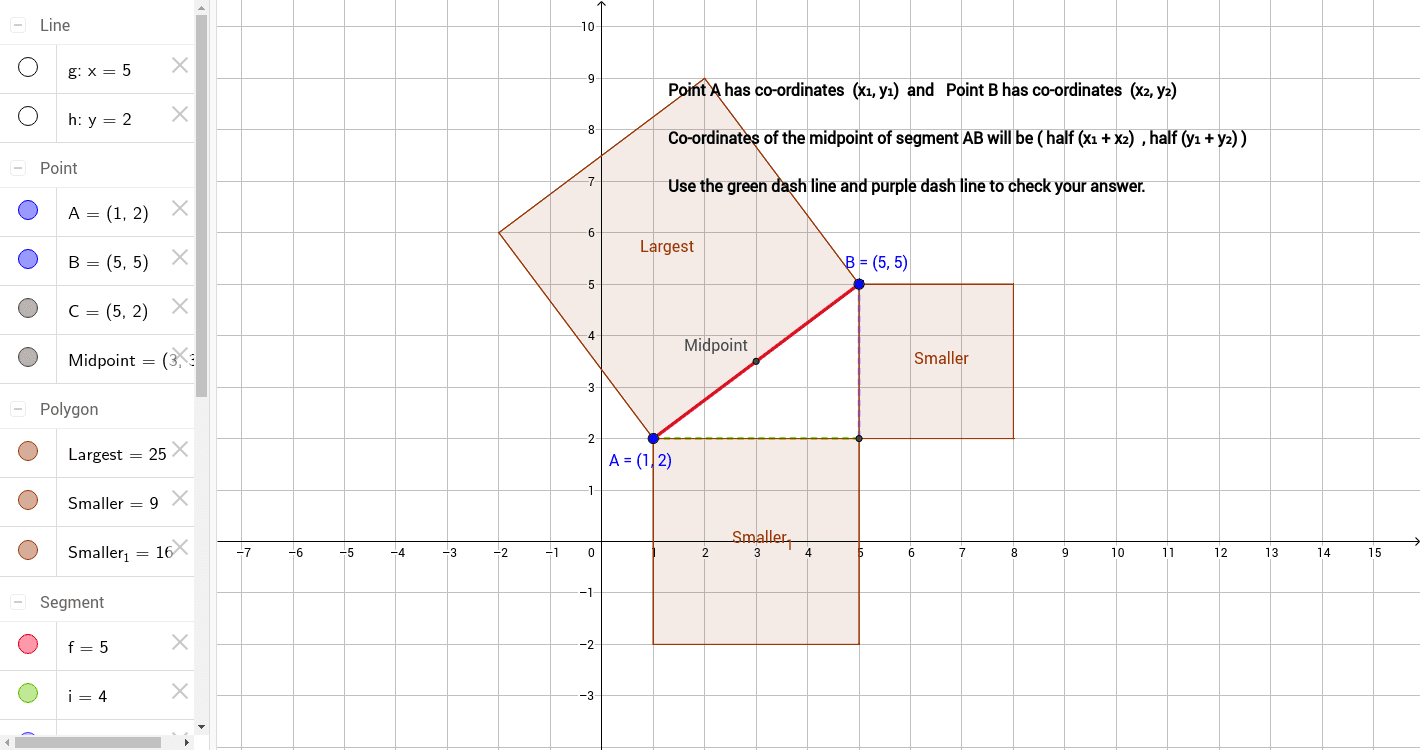
This example demonstrates how to draw a line segment and calculate its midpoint and length using GeoGebra. Key math concepts include line segments, midpoints, length calculation, and coordinate geometry. Construction highlights involve commands like Segment, Midpoint, OrthogonalLine, Intersect, and Polygon. Suitable for middle school students and above learning about line segments, midpoints, and coordinate geometry, or for educational demonstrations.
GeoGebra Commands & Parameters
Segment(A, B) → fMidpoint(f) → MidpointOrthogonalLine(B, xAxis) → gOrthogonalLine(A, yAxis) → hIntersect(h, g) → CSegment(A, C) → iSegment(B, C) → jPolygon(B, C, 4) → Smaller, k, l, m, n, D, EPolygon(C, A, 4) → Smaller_1, p, q, r, s, F, GPolygon(A, B, 4) → Largest, t, a, b, c, H, I
AI Drawing Prompt Reference
Draw a line segment and find its midpoint. Then, draw perpendicular lines from each endpoint to the coordinate axes, and find their intersection point. Construct three squares using these three points, with the line segment as the side of the largest square and the midpoint as a vertex of the other two smaller squares.
The prompt above was compiled from the original drawing commands and is for reference only.