
Mesh Surface Example
Loading the math board and drawing, please wait…
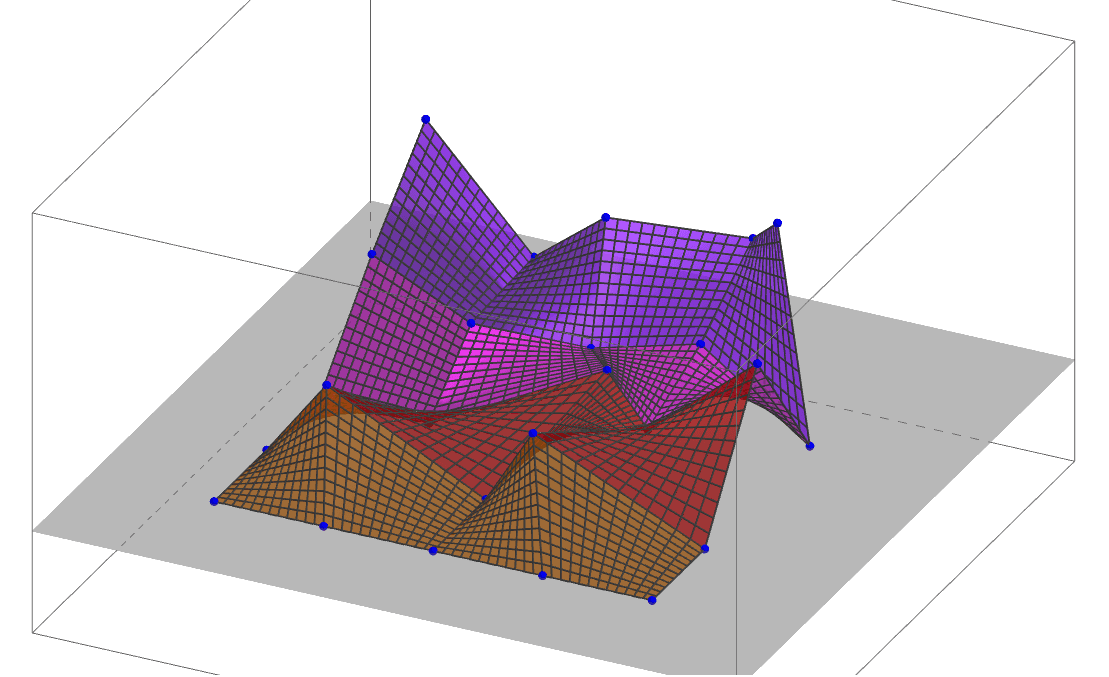
This example demonstrates how to create a 3D mesh surface using GeoGebra, involving core concepts like 3D graphics, matrix operations, sequence generation, and surface functions. Key GeoGebra commands used include Sequence and Surface, with objects like A-Z and lists liste1-liste4. Suitable for high school and above students studying solid geometry, coordinate geometry, and CAD.
GeoGebra Commands & Parameters
Sequence(Surface[(x((Element[LP, i] * (1 - v)) + (Element[LP, i + 5] * v)) * (1 - u)) + (x((Element[LP, i + 1] * (1 - v)) + (Element[LP, i + 6] * v)) * u), (y((Element[LP, i] * (1 - u)) + (Element[LP, i + 1] * u)) * (1 - v)) + (y((Element[LP, i + 5] * (1 - u)) + (Element[LP, i + 6] * u)) * v), ((z(Element[LP, i]) * (1 - u)) * (1 - v)) + ((z(Element[LP, i + 1]) * u) * (1 - v)) + ((z(Element[LP, i + 5]) * (1 - u)) * v) + ((z(Element[LP, i + 6]) * u) * v), u, 0, 1, v, 0, 1], i, 1, 4) → liste1Surface((x((Element[LP, 1] * (1 - v)) + (Element[LP, 6] * v)) * (1 - u)) + (x((Element[LP, 2] * (1 - v)) + (Element[LP, 7] * v)) * u), (y((Element[LP, 1] * (1 - u)) + (Element[LP, 2] * u)) * (1 - v)) + (y((Element[LP, 6] * (1 - u)) + (Element[LP, 7] * u)) * v), ((z(Element[LP, 1]) * (1 - u)) * (1 - v)) + ((z(Element[LP, 2]) * u) * (1 - v)) + ((z(Element[LP, 6]) * (1 - u)) * v) + ((z(Element[LP, 7]) * u) * v), u, 0, 1, v, 0, 1) → aSequence(Surface[(x((Element[LP, i] * (1 - v)) + (Element[LP, i + 5] * v)) * (1 - u)) + (x((Element[LP, i + 1] * (1 - v)) + (Element[LP, i + 6] * v)) * u), (y((Element[LP, i] * (1 - u)) + (Element[LP, i + 1] * u)) * (1 - v)) + (y((Element[LP, i + 5] * (1 - u)) + (Element[LP, i + 6] * u)) * v), ((z(Element[LP, i]) * (1 - u)) * (1 - v)) + ((z(Element[LP, i + 1]) * u) * (1 - v)) + ((z(Element[LP, i + 5]) * (1 - u)) * v) + ((z(Element[LP, i + 6]) * u) * v), u, 0, 1, v, 0, 1], i, 6, 9) → liste2Sequence(Surface[(x((Element[LP, i] * (1 - v)) + (Element[LP, i + 5] * v)) * (1 - u)) + (x((Element[LP, i + 1] * (1 - v)) + (Element[LP, i + 6] * v)) * u), (y((Element[LP, i] * (1 - u)) + (Element[LP, i + 1] * u)) * (1 - v)) + (y((Element[LP, i + 5] * (1 - u)) + (Element[LP, i + 6] * u)) * v), ((z(Element[LP, i]) * (1 - u)) * (1 - v)) + ((z(Element[LP, i + 1]) * u) * (1 - v)) + ((z(Element[LP, i + 5]) * (1 - u)) * v) + ((z(Element[LP, i + 6]) * u) * v), u, 0, 1, v, 0, 1], i, 11, 14) → liste3Sequence(Surface[(x((Element[LP, i] * (1 - v)) + (Element[LP, i + 5] * v)) * (1 - u)) + (x((Element[LP, i + 1] * (1 - v)) + (Element[LP, i + 6] * v)) * u), (y((Element[LP, i] * (1 - u)) + (Element[LP, i + 1] * u)) * (1 - v)) + (y((Element[LP, i + 5] * (1 - u)) + (Element[LP, i + 6] * u)) * v), ((z(Element[LP, i]) * (1 - u)) * (1 - v)) + ((z(Element[LP, i + 1]) * u) * (1 - v)) + ((z(Element[LP, i + 5]) * (1 - u)) * v) + ((z(Element[LP, i + 6]) * u) * v), u, 0, 1, v, 0, 1], i, 16, 19) → liste4
AI Drawing Prompt Reference
Create a 3D mesh surface by generating multiple quadrilateral patches through sequences, where each patch is defined by four vertices with coordinates calculated by linear interpolation, ensuring smooth transitions between patches to form a continuous surface, demonstrating the application of 3D graphics, matrix operations, sequence generation, and surface functions.
The prompt above was compiled from the original drawing commands and is for reference only.