
Measuring Pond Width Using Similar Triangles
Loading the math board and drawing, please wait…
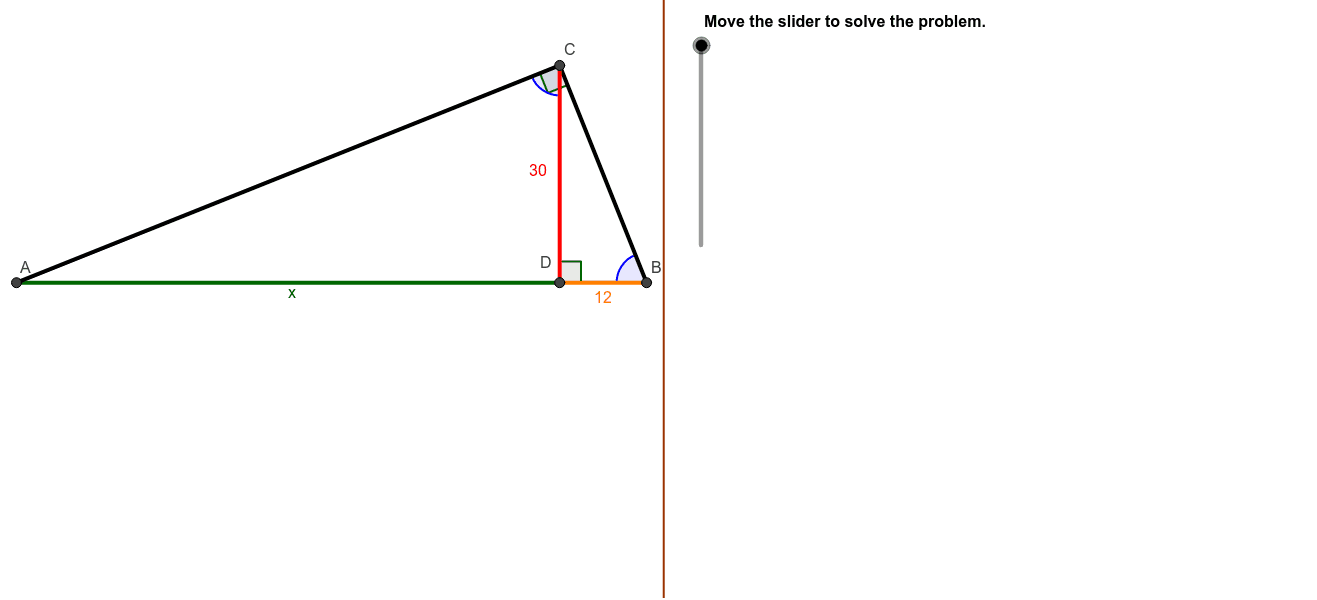
This example demonstrates how to measure the width of a pond using the principle of similar triangles. Rita climbs a 30-foot observation tower and locates points A and B on the opposite shore, utilizing the properties of similar triangles to calculate the distance. The core mathematical concepts involved include similar triangles, trigonometric functions, and geometric construction. Key construction steps involve using GeoGebra commands such as Polygon, Segment, OrthogonalLine, Circle, Intersect, and Angle to create shapes, lines, and calculate proportions. Suitable for high school mathematics education, illustrating the application of similar triangles and trigonometric functions.
GeoGebra Commands & Parameters
Polygon((Edge, y(Corner[1])), Corner[2], Corner[3], (Edge, y(Corner[4]))) → Mask, a, b, c, dSegment(D, B) → BD_1Segment(A, D) → ADSegment(A, B) → ABOrthogonalLine(D, AB) → eCircle(E, B) → fIntersect(f, e) → C2, CSegment(A, C) → ACSegment(B, C) → BCSegment(C, D) → CD_1Angle(B, D, C) → BDCAngle(A, C, B) → ACBAngle(D, B, C) → CBDAngle(D, C, A) → BCA
AI Drawing Prompt Reference
Draw a pond with a 30-foot observation tower. A person on the tower observes two points on the opposite shore and measures the pond's width using similar triangles. Sketch the tower, pond, and the two observation points. Connect these points to form triangles. Draw a perpendicular line from the observation point to the opposite shore, creating intersections. Connect these intersections to the observation points, highlighting similar triangles and the application of trigonometric functions.
The prompt above was compiled from the original drawing commands and is for reference only.