
Measuring Pond Distance
Loading the math board and drawing, please wait…
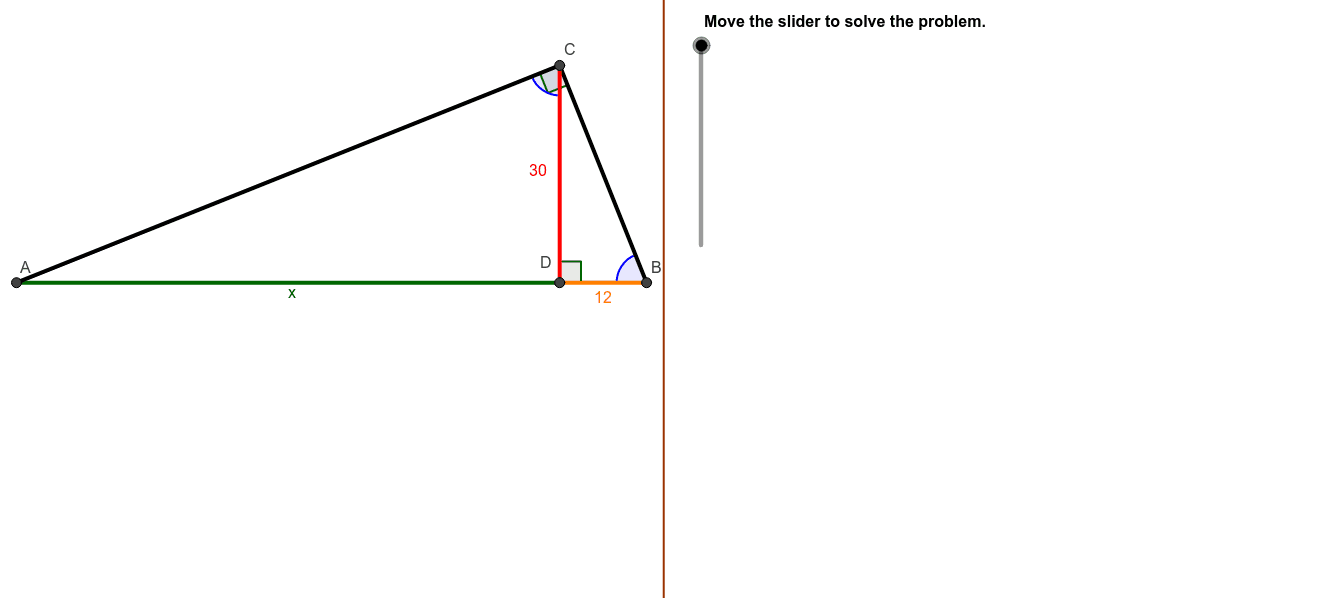
This example demonstrates measuring the distance across a pond using the principle of similar triangles. Key math concepts include similar triangles and trigonometry. GeoGebra commands like Polygon, Segment, OrthogonalLine, Circle, Intersect, and Angle are used to construct the geometric model. Suitable for middle school students and above learning geometric constructions and real-world applications.
GeoGebra Commands & Parameters
Polygon((Edge, y(Corner[1])), Corner[2], Corner[3], (Edge, y(Corner[4]))) → Mask, a, b, c, dSegment(D, B) → BD_1Segment(A, D) → ADSegment(A, B) → ABOrthogonalLine(D, AB) → eCircle(E, B) → fIntersect(f, e) → C2, CSegment(A, C) → ACSegment(B, C) → BCSegment(C, D) → CD_1Angle(B, D, C) → BDCAngle(A, C, B) → ACBAngle(D, B, C) → CBDAngle(D, C, A) → BCA
AI Drawing Prompt Reference
Draw a quadrilateral representing a pond with a line segment from a point on one side to the opposite side, then draw a perpendicular line from the point to the side, connecting the foot of the perpendicular to the point on the side, forming two similar triangles. Measure and label the angles to demonstrate the application of similar triangles and trigonometry.
The prompt above was compiled from the original drawing commands and is for reference only.