
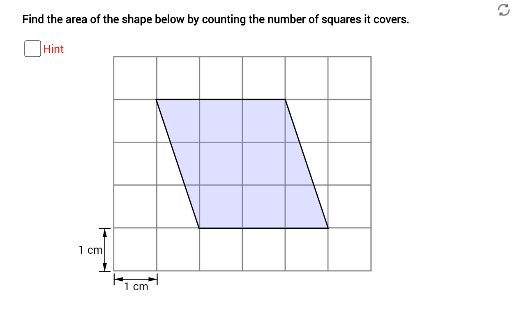
Measuring Area of 2D Shapes: Counting Covered Squares
Loading the math board and drawing, please wait…
In collections
P4 Area (I)
This example demonstrates how to measure the area of a 2D shape by counting the squares it covers. The key math concepts involve area calculation and geometric construction. The construction uses GeoGebra commands like Segment, Vector, Translate, and Polygon. It is suitable for middle school students or those needing basic geometry practice.
GeoGebra Commands & Parameters
Segment(X0, X0 + (0, 0.25)) → gSegment(X0, X0 + (0, mark)) → hSegment(X0 + (1, 0), X0 + (1, mark)) → iVector(X0 + (0, mark / 2), X0 + (1, mark / 2)) → uVector(X0 + (1, mark / 2), X0 + (0, mark / 2)) → vSegment(Y0 - (mark, 0), Y0) → jSegment(Y0 - (mark, 1), Y0 - (0, 1)) → kVector(Y0 - (mark / 2, 1), Y0 - (mark / 2, 0)) → wVector(Y0 - (mark / 2, 0), Y0 - (mark / 2, 1)) → zPoint(yAxis) → APoint(xAxis) → BPoint(xAxis) → CPoint(xAxis) → ETranslate(A, Vector[(t1 * Vector[A, D])]) → A'Translate(B, Vector[(t1 * Vector[A, D])]) → B'Translate(F, Vector[(t1 * Vector[A, D])]) → F'Polygon(A', B', F') → poly1, f', a', b'Translate(C, Vector[(t2 * Vector[D, A])]) → C'Translate(D, Vector[(t2 * Vector[D, A])]) → D'Translate(E, Vector[(t2 * Vector[D, A])]) → E'Polygon(C', D', E') → poly2, e', c', d'Polygon(A', B', F') → poly1', f'_1, a'_1, b'_1Polygon(C', D', E') → poly2', e'_1, c'_1, d'_1Polygon(B, E, D, F) → poly3, b, e, d, fPolygon(A, B, C, D) → poly4, a, b_1, c, d_1Polygon(A, B, F) → poly5, f_1, a_1, b_2Polygon(C, D, E) → poly6, e_1, c_1, d_2
AI Drawing Prompt Reference
Draw a 2D shape composed of multiple squares and rectangles to demonstrate how to measure area by counting covered squares. Start by creating a basic grid, then construct two overlapping geometric shapes, a parallelogram and a trapezoid, by moving and rotating them to show area calculation. Finally, connect the boundaries of the shapes and highlight the covered squares to visually demonstrate the area measurement method.
The prompt above was compiled from the original drawing commands and is for reference only.