
Measurement: Year 9 Maths_ Area of an Arrow
Loading the math board and drawing, please wait…
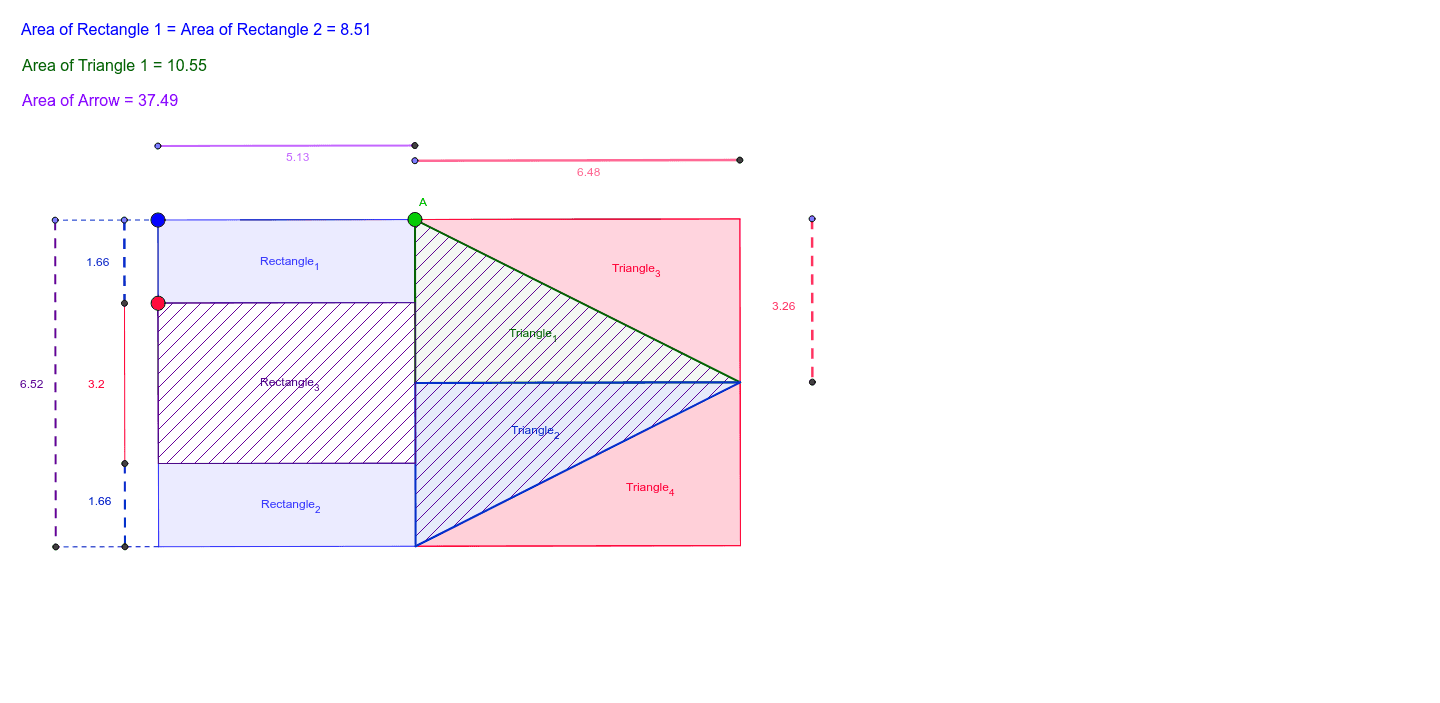
This example demonstrates how to investigate the area of an arrow as a composite shape using an interactive tool. Key math concepts include area calculation, geometric construction, and coordinate system application. The construction involves commands/objects like Segment, Midpoint, Circle, Point, Tangent, Line, Intersect, OrthogonalLine, Polygon, and Area in GeoGebra. Suitable for Year 9 students or learners reviewing area calculations of composite figures.
GeoGebra Commands & Parameters
Segment(B_1, C) → aMidpoint(a) → DCircle(D, B_1) → cPoint(a) → ECircle(D, E) → dTangent(B_1, c) → b,Line(E, b) → eLine(C, b) → fIntersect(d, a) → A_1, FLine(F, b) → gPoint(b) → GLine(D, b) → iPoint(b) → LPoint(b) → HSegment(H, G) → hPoint(h) → AOrthogonalLine(A, h) → kPoint(b) → JSegment(L, J) → jPoint(j) → BOrthogonalLine(B, j) → lIntersect(k, e) → MIntersect(k, i) → NIntersect(g, k) → OIntersect(k, f) → PIntersect(l, e) → QIntersect(l, i) → RIntersect(l, g) → SIntersect(l, f) → TSegment(A, R) → mSegment(P, R) → nSegment(A, M) → pSegment(P, O) → qSegment(M, E) → rSegment(E, F) → sSegment(F, O) → tPolygon(A, M, E, D, F, O, P, R) → poly1, i_1, m_1, e_1, d_1, f_1, o, p_1, r_1Polygon(E, B_1, A, M) → Rectangle_1, e_2, b_1, i_2, m_2Polygon(F, C, P, O) → Rectangle_2, f_2, c_1, p_2, o_1Polygon(A, N, R, B) → poly4, i_3, n_1, r_2, k_1Polygon(N, P, T, R) → poly5, n_2, p_3, t_1, r_3Polygon(R, B, A) → Triangle_3, i_4, r_4, k_2Polygon(P, R, T) → Triangle_4, t_2, p_4, r_5Polygon(A, N, R) → Triangle_1, r_6, i_5, n_3Polygon(N, P, R) → Triangle_2, r_7, n_4, p_5Point(b) → IOrthogonalLine(I, b) → a_1Intersect(e, a_1) → KIntersect(g, a_1) → UIntersect(f, a_1) → VPoint(b) → WOrthogonalLine(W, b) → g_1Intersect(e, g_1) → ZIntersect(g, g_1) → C_1Intersect(f, g_1) → D_1Segment(W, D_1) → h_1Segment(I, K) → j_1Segment(B_1, W) → l_1Segment(C, D_1) → q_1Segment(K, U) → s_1Segment(U, V) → a_2OrthogonalLine(B_1, b_1) → b_2Point(b_2) → E_1OrthogonalLine(E_1, b_2) → c_2Intersect(c_2, k) → F_1Point(k) → G_1OrthogonalLine(G_1, k) → d_2Intersect(d_2, l) → H_1Segment(E_1, F_1) → g_2Segment(G_1, H_1) → h_2Polygon(E, M, O, F) → Rectangle_3, e_3, m_3, o_2, f_3OrthogonalLine(R, i_4) → j_2OrthogonalLine(B, i_4) → l_2Point(l_2) → I_1OrthogonalLine(I_1, l_2) → q_2Intersect(q_2, j_2) → J_1Segment(I_1, J_1) → s_2Point(s_2) → K_1Area(Rectangle_1) → uArea(Rectangle_3) → vArea(poly1) → wArea(Triangle_1) → u_1
AI Drawing Prompt Reference
Draw an arrow shape by first sketching the base and tip, then creating two circles centered at the midpoint of the base and the tangent point, connecting the tangent point to the tip. Add auxiliary lines at intersection points, fill the enclosed areas formed by these points and lines, while keeping some lines visible to outline the arrow and its internal segments.
The prompt above was compiled from the original drawing commands and is for reference only.