
Measure 2D Shape Area by GeoGebra Institute of Hong Kong (2)
Loading the math board and drawing, please wait…
In collections
P4 Area (I)
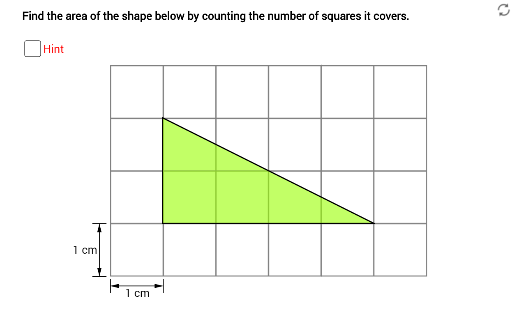
This example demonstrates how to measure the area of a 2D shape by counting the squares it covers. It involves core math concepts like area calculation and geometric shape coverage. GeoGebra commands/objects used include Segment, Vector, Point, Intersect, Rotate, and Polygon. Suitable for middle school and above students learning area calculation methods and complex shape area estimation.
GeoGebra Commands & Parameters
Segment(X0, X0 + (0, 0.25)) → gSegment(X0, X0 + (0, mark)) → hSegment(X0 + (1, 0), X0 + (1, mark)) → iVector(X0 + (0, mark / 2), X0 + (1, mark / 2)) → uVector(X0 + (1, mark / 2), X0 + (0, mark / 2)) → vSegment(Y0 - (mark, 0), Y0) → jSegment(Y0 - (mark, 1), Y0 - (0, 1)) → kVector(Y0 - (mark / 2, 1), Y0 - (mark / 2, 0)) → wVector(Y0 - (mark / 2, 0), Y0 - (mark / 2, 1)) → zSegment((3, -1), (3, 3)) → lPoint(yAxis) → AIntersect(xAxis, yAxis) → BPoint(xAxis) → CPoint(xAxis) → EPoint(yAxis) → FRotate(A, (-180° * t1), D) → A'Rotate(F, (-180° * t1), D) → F'Rotate(D, (-180° * t1), D) → D'Polygon(A', F', D') → poly1, d', a', f'Rotate(C, (180° * t2), D) → C'Rotate(D, (180° * t2), D) → D'_1Rotate(E, (180° * t2), D) → E'Polygon(C', D'_1, E') → poly2, e', c', d'_1Polygon(A', F', D') → poly1', d'_2, a'_1, f'_1Polygon(C', D'_1, E') → poly2', e'_1, c'_1, d'_3Polygon(B, E, D, F) → poly3, b, e, d, fPolygon(A, B, C) → poly4, c, a, b_1Polygon(A, F, D, E, C) → poly5, a_1, f_1, d_1, e_1, c_1
AI Drawing Prompt Reference
Draw a geometric figure composed of multiple line segments and vectors, including a central point and two perpendicular line segments. Generate several polygons through rotation and intersection to demonstrate shape coverage and area calculation. Start by drawing the central point and perpendicular lines, then create vectors and rotate to form new segments, intersect to create polygons, and finally combine these to show different geometric shapes and coverage areas.
The prompt above was compiled from the original drawing commands and is for reference only.