
Meaning of Similar Figures
Loading the math board and drawing, please wait…
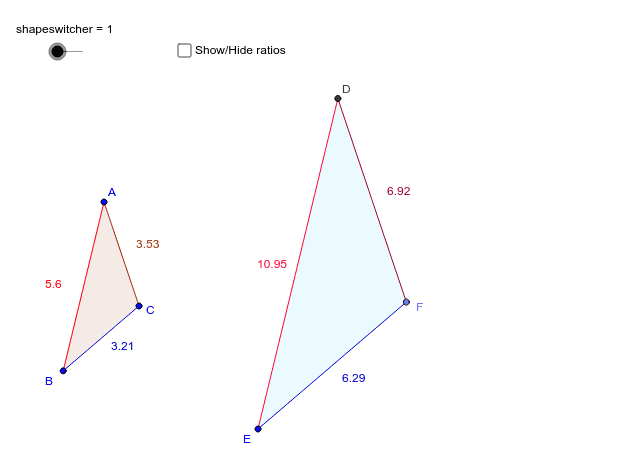
① This applet demonstrates how to observe multiple figures that remain similar — corresponding angles stay equal and corresponding sides stay proportional — while their size changes dynamically. ② Core mathematical concepts include the definition of similar figures, angle correspondence, side‑ratio proportionality, and geometric transformations such as rotation and scaling. ③ Construction highlights: Polygon creates the base polygons; Angle measures angles; Line, Point, Rotate, Intersect, OrthogonalLine, Segment, and Circle build the auxiliary elements. Key objects are vertices A, B, C, P, circle c, edges a, b, angles α, β, γ, line d, points E, F, G, δ, ε, h, i, D, Q, and a shapeswitcher for toggling figures. ④ Suitable for middle‑school geometry lessons on similarity, high‑school review, teacher‑created instructional materials, and student‑driven exploration of similarity transformations.
GeoGebra Commands & Parameters
Polygon(A, B, C) → P, c, a, bAngle(P) → α, β, γLine(B, C) → dLine(E, d) → ePoint(e) → FRotate(F, β, E) → GAngle(F, E, G) → δRotate(E, -γ, F) → F_1Angle(F_1, F, E) → εLine(E, G) → hLine(F, F_1) → iIntersect(h, i) → DPolygon(D, E, F) → Q, e_1, h_1, d_1Line(H, I) → fOrthogonalLine(H, f) → gOrthogonalLine(I, f) → jPoint(g) → JLine(J, f) → kIntersect(j, k) → KPolygon(H, I, K, J) → poly1, h_2, i_1, k_1, j_1Line(L, h_2) → lPoint(l) → MOrthogonalLine(L, l) → mOrthogonalLine(M, l) → nSegment(L, M) → pCircle(L, j_1 * scalerectangle) → qIntersect(q, m, 2) → NOrthogonalLine(N, m) → rIntersect(n, r) → OPolygon(N, L, M, O) → poly2, n_1, l_1, m_1, oSegment(A, B) → tSegment(D, E) → a_1Segment(B, C) → b_1Segment(E, F) → c_1Segment(A, C) → f_1Segment(D, F) → g_1Segment(J, H) → p_1Segment(N, L) → q_1Segment(H, I) → r_1Segment(L, M) → s_1
AI Drawing Prompt Reference
Draw a triangle ABC, then create a similar triangle DEF around points B and C, followed by another similar triangle GHI around points E and F, and finally a similar triangle JKL around points G and H. Ensure that each triangle has corresponding angles equal and corresponding sides proportional. Draw auxiliary lines and points such as line d, point F, rotated point G, line h and i, point D, etc., to help construct the similar triangles.
The prompt above was compiled from the original drawing commands and is for reference only.