
Max Min with Derivatives
Loading the math board and drawing, please wait…
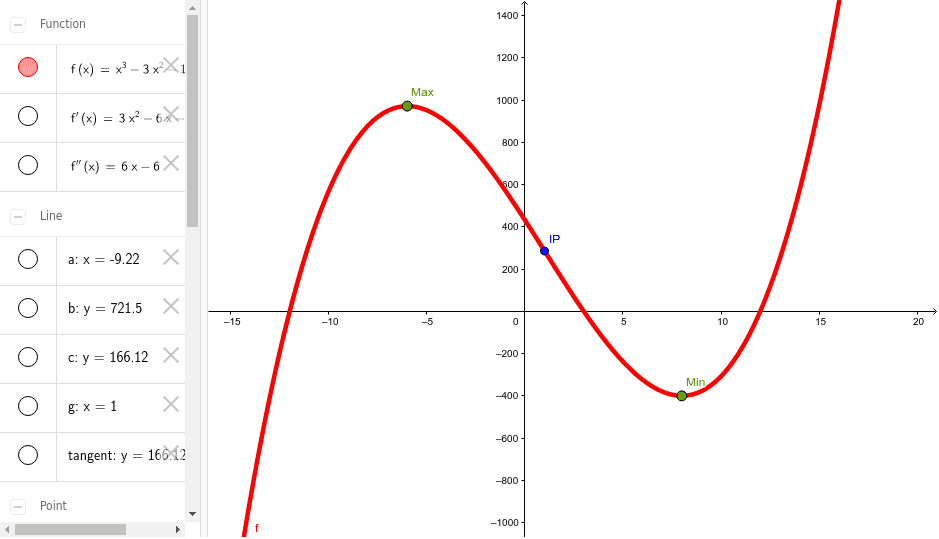
This example demonstrates how to use derivatives to find the maximum and minimum points of a function. Key mathematical concepts include derivatives, extreme points, and optimization. By constructing the derivative of the function, tangents, and orthogonal lines, students can understand the application of derivatives in solving optimization problems. GeoGebra commands used include Derivative, Point, Tangent, OrthogonalLine, Intersect, and Segment. Suitable for high school mathematics education and learning.
GeoGebra Commands & Parameters
Derivative(f) → f'Derivative(f') → f''Point(f) → MaxPoint(f) → MinPoint(f) → CTangent(C, f) → tangentOrthogonalLine(C, xAxis) → aOrthogonalLine(C, yAxis) → bIntersect(a, xAxis) → DIntersect(b, yAxis) → ESegment(C, E) → dSegment(C, D) → eIntersect(f', e) → FOrthogonalLine(F, yAxis) → cIntersect(c, yAxis) → GSegment(F, G) → hIntersect(f'', xAxis) → HOrthogonalLine(H, xAxis) → gIntersect(f, g) → IPSegment(H, IP) → i
AI Drawing Prompt Reference
Draw the graph of a function and find its extreme points. First, calculate the first and second derivatives of the function. Then, draw the tangent and perpendicular lines at the extreme points, and find their intersections with the coordinate axes. Connect these intersections and the extreme points with line segments. Finally, use the second derivative and perpendicular lines to the coordinate axes to find the inflection point and draw the corresponding line segments.
The prompt above was compiled from the original drawing commands and is for reference only.