
Matrix Representation for Reflection in Line y=mx
Loading the math board and drawing, please wait…
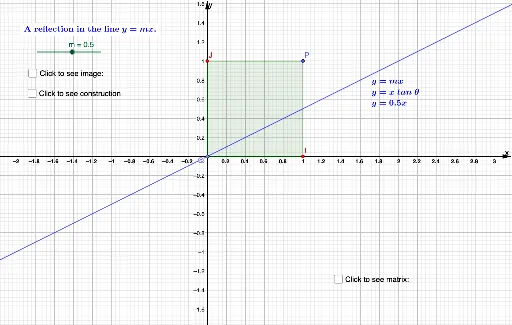
This example demonstrates how to represent a reflection across the line y=mx using a matrix in a Cartesian coordinate system. Key math concepts include linear transformations, matrix operations, and analytical geometry concepts like point reflection. GeoGebra commands/objects used in construction include Point, Polygon, Mirror, Angle, and Segment. Suitable for high school students and above studying linear algebra and analytical geometry, or for educational purposes.
GeoGebra Commands & Parameters
Point(yAxis) → OPoint(yAxis) → JPolygon(O, I, P, J) → q1, o, i, p, jMirror(O, f) → O'Mirror(I, f) → I'Mirror(P, f) → P'Mirror(J, f) → J'Polygon(O', I', P', J') → q1', o', i', p', j'Point(f) → AAngle(I, O, A) → αAngle(A, O, I') → βSegment(B, I') → gAngle(I', B, O) → γAngle(C, O, J') → δSegment(J', C) → hAngle(J', C, O) → ε
AI Drawing Prompt Reference
In a Cartesian coordinate system, draw a line y=mx and mark points O and J on it. Take other points I and P to form a quadrilateral OIPJ. Reflect points O, I, P, and J across the line to get O', I', P', and J'. Connect these reflected points to form the quadrilateral O'I'P'J'. Indicate the angles between the reflection axis and points O, I, I', J, and J', and draw line segments from the reflected points to the origin.
The prompt above was compiled from the original drawing commands and is for reference only.