
Matrices - Algebraic Operations
Loading the math board and drawing, please wait…
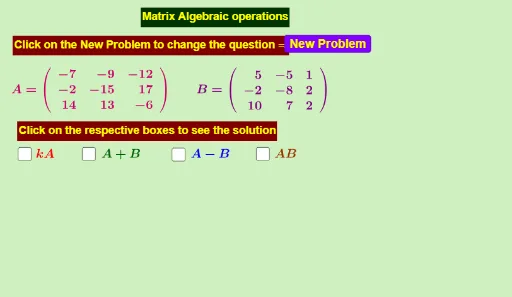
This example demonstrates algebraic operations on matrices, including addition, subtraction, and scalar multiplication. By examining the commands in the construction summary, one can learn how to create and manipulate matrices in GeoGebra. Suitable for high school mathematics education and learning.
GeoGebra Commands & Parameters
Random(-20, 20) → a1Random(-20, 20) → b1Random(-20, 20) → c1Random(-20, 20) → a2Random(-20, 20) → b2Random(-20, 20) → c2Random(-20, 20) → a3Random(-20, 20) → b3Random(-20, 20) → c3Random(-10, 10) → d1Random(-10, 10) → d2Random(-10, 10) → d3Random(-10, 10) → e1Random(-10, 10) → e2Random(-10, 10) → e3Random(-10, 10) → f1Random(-10, 10) → f2Random(-10, 10) → f3
AI Drawing Prompt Reference
Create a graphic for matrix operations, including two 2x2 matrices A and B, and their sum, difference, and scalar multiplication results. First, create matrix A with elements a1, b1, c1, d1; then create matrix B with elements a2, b2, c2, d2; next, calculate the sum A+B, difference A-B, and scalar multiplication 2A, and display them on the graphic.
The prompt above was compiled from the original drawing commands and is for reference only.