
Mass, Volume, and Density Word Problem
Loading the math board and drawing, please wait…
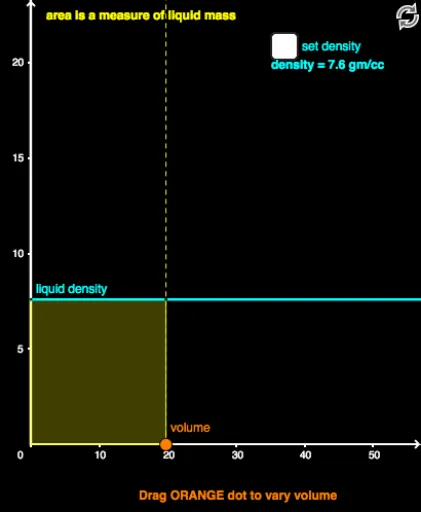
This example demonstrates the relationship between mass, volume, and density. By constructing geometric shapes, students can visually understand the mathematical relationships between these physical quantities. Commands used include Ray, Point, Intersect, Segment, and Polygon. Suitable for middle school and above students to learn related concepts in physics and mathematics.
GeoGebra Commands & Parameters
Ray((0, 0), (1, 0)) → aRay((0, 0), (0, 1)) → bPoint(b) → APoint(b) → massPoint(a) → volumePoint(b) → densityRay(volume, (x(volume), 1)) → cIntersect(f, c, (19.743436707720868, 198.71718353860433)) → CSegment(C, mass_1) → dRay(density, (1, y(density))) → eIntersect(e, c) → EPolygon(density, E, volume, F) → poly1, b_1, e_1, a_1, f_1Ray(mass, (1, y(mass))) → iIntersect(i, c) → HIntersect(a, b) → IPolygon(J, K, volume, F) → poly2, j_1, k, a_2, f_2Ray(J, K) → lRay(A, H) → r
AI Drawing Prompt Reference
On a coordinate plane, draw two rays from the origin, one horizontal to the right and one vertical upward, as axes. Place three points on the vertical ray representing mass, density, and an auxiliary point, and one point on the horizontal ray representing volume. From the volume point, draw a vertical ray upward to intersect a horizontal line, creating an intersection. From the density point, draw a horizontal ray to the right to meet the vertical ray. Connect relevant points to form two rectangles showing relationships between mass-volume and density-volume. Add auxiliary rays and segments to illustrate proportional relationships among mass, volume, and density.
The prompt above was compiled from the original drawing commands and is for reference only.