
Making Similar Triangles by Anthony OR 柯志明 (2)
Loading the math board and drawing, please wait…
In collections
Making Similar Triangles
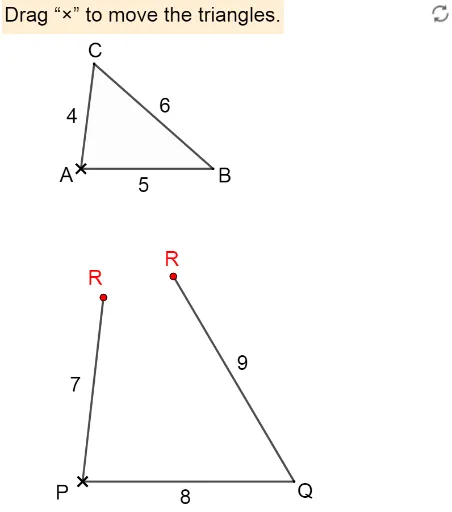
This example demonstrates how to generate similar triangles through transformations. Key mathematical concepts include the properties of similar triangles and similarity transformations. Using GeoGebra commands such as Intersect, Polygon, and Point, similar triangles can be dynamically constructed. Suitable for students in middle school and above to learn about similar triangles.
GeoGebra Commands & Parameters
Intersect(Circle[A, 4], Circle[B, 6], 1) → CPolygon(A, B, C) → t1, c, a, bTextfield(r) → InputBox1Textfield(p) → InputBox2Textfield(q) → InputBox3Intersect(Circle[P, q], Circle[Q, p]) → R_1, R_2, ,Point(Circle[P, q]) → R1Point(Circle[Q, p]) → R2If(Distance[R1, R_1] < δ, true, false) → close11If(Distance[R1, R_2] < δ, true, false) → close12If(Distance[R2, R_1] < δ, true, false) → close21If(Distance[R2, R_2] < δ, true, false) → close22DynamicCoordinates(R1, If[close11, x(R_1), If[close12, x(R_2), x(R1)]], If[close11, y(R_1), If[close12, y(R_2), y(R1)]]) → RDynamicCoordinates(R2, If[close21, x(R_1), If[close22, x(R_2), x(R2)]], If[close21, y(R_1), If[close22, y(R_2), y(R2)]]) → R'Segment(P, Q) → fSegment(P, R) → gSegment(Q, R') → hPolygon(P, Q, R_1) → t2, r_1, p_1, q_1Polygon(P, Q, R_2) → t3, r_2, p_2, q_2If(a / p ≟ b / q ≟ c / r, true, false) → proportionalIf(proportional ∧ (closed1 ∨ closed2), true, false) → doneAngle(B, A, C) → αAngle(C, B, A) → βAngle(A, C, B) → γAngle(Q, P, R_1) → εAngle(R_1, Q, P) → ζAngle(P, R_1, Q) → ηAngle(R_2, P, Q) → θAngle(Q, R_2, P) → ιAngle(P, Q, R_2) → κ
AI Drawing Prompt Reference
Draw two similar triangles generated through transformations. Start by drawing a circle and a square, then find their intersection points to form the first triangle. Next, using two input values, draw circles centered at these points to find the second triangle's vertices. Ensure the triangles are similar, dynamically display their vertices and edges, and measure and show the interior angles to verify similarity.
The prompt above was compiled from the original drawing commands and is for reference only.