
Magnitude and Direction of Vectors in GeoGebra
Loading the math board and drawing, please wait…
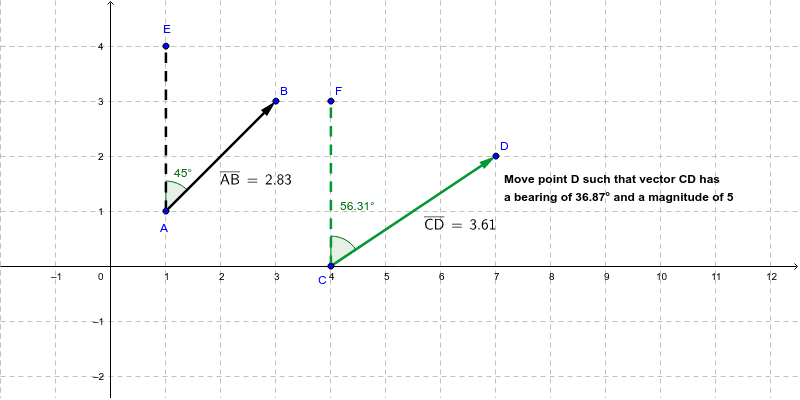
This GeoGebra example demonstrates that vectors have both magnitude and direction by constructing vectors u and v from points A, B, C, and D. It highlights core concepts such as vector representation, segment length, direction angle, and distance measurement. The construction uses the Vector command to create u and v, Segment to connect points, Angle to label α and β, and Distance to compute distanceAB and distanceCD, with TextAB, TextCD, text1, and text2 displaying dynamic values and explanations. It is suitable for secondary mathematics, introductory vector lessons, coordinate geometry, and GeoGebra classroom demonstrations.
GeoGebra Commands & Parameters
Vector(A, B) → uVector(C, D) → vAngle(B, A, E) → αSegment(A, E) → aSegment(C, F) → bAngle(D, C, F) → βDistance(A, B) → distanceABDistance(C, D) → distanceCD
AI Drawing Prompt Reference
Draw a coordinate plane with four points, forming two vectors from pairs of points. Each vector starts at one point and ends at another. At each vector's starting point, draw an auxiliary segment so that an angle is marked between the vector and the segment. Also display the lengths of both vectors as numerical labels, and add text notes explaining that vectors have both magnitude and direction. Keep the layout clear, emphasizing the geometric relationships among vectors, angles, and distances.
The prompt above was compiled from the original drawing commands and is for reference only.