
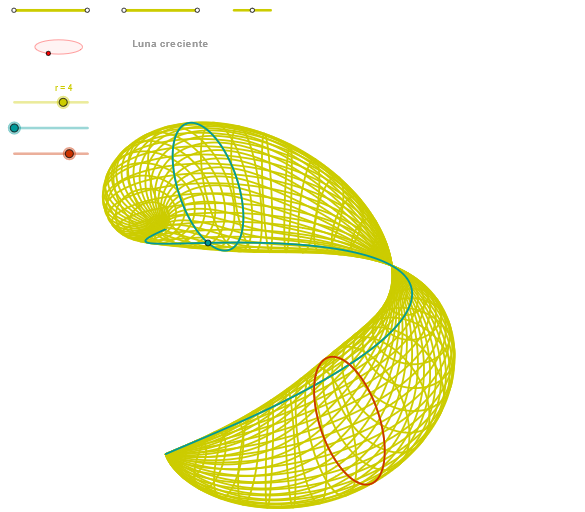
Luna creciente: Geometry and Probability Exploration
Loading the math board and drawing, please wait…
In collections
geometriadinamica.es
This example demonstrates how to explore mathematical phenomena through geometric figures and probability concepts. Key mathematical concepts include ellipses, linear equations, Pythagorean theorem, and probability statistics. Construction involves GeoGebra commands such as Segment, OrthogonalLine, Circle, Ellipse, and Angle. Suitable for middle or high school mathematics learning, used for geometric construction and probability analysis exercises.
GeoGebra Commands & Parameters
Segment(Q3, Q4) → p2Point(p2) → P3Segment(P3, Q4) → p4Point(p4) → P4Segment(Q1, Q2) → p1Point(p1) → P1Segment(P1, Q2) → p3Point(p3) → P2OrthogonalLine(C, xAxis) → zz2Circle(C, 0.62) → zz0Intersect(zz0, zz2, 1) → ZZ4Intersect(zz0, zz2, 2) → ZZ3Ellipse(ZZ3, ZZ4, 0.65) → zElipse2Point(zElipse2) → ZIntersect(zElipse2, zz2) → ZZ7, ZZ8Angle(ZZ8, C, Z) → zAngIncOrthogonalLine(C, yAxis) → zz1Intersect(zz0, zz1, 2) → ZZ2Intersect(zz0, zz1, 1) → ZZ1Ellipse(ZZ1, ZZ2, 0.65) → zElipse1Point(zElipse1) → XYIntersect(zElipse1, zz1) → ZZ5, ZZ6Angle(ZZ6, C, XY) → zAngRotSegment(Q5, Q6) → p5Point(p5) → P5CurveCartesian((r / 2.2 * ((((a + (sin(((b * 3.14) * u)) * sin(((b * 3.14) * 0.25)))) * sin(((c * 3.14) * 0.25))) * sin(zAngRot)) + (((a + (sin(((b * 3.14) * u)) * sin(((b * 3.14) * 0.25)))) * cos(((c * 3.14) * 0.25))) * cos(zAngRot)))), (r / 2.2 * (((((-(a + (sin(((b * 3.14) * u)) * sin(((b * 3.14) * 0.25))))) * sin(((c * 3.14) * 0.25))) * cos(zAngRot)) * sin(zAngInc)) + ((((a + (sin(((b * 3.14) * u)) * sin(((b * 3.14) * 0.25)))) * cos(((c * 3.14) * 0.25))) * sin(zAngRot)) * sin(zAngInc)) + (((cos(((b * 3.14) * u)) * sin(((b * 3.14) * 0.25))) + (4 * 0.25) - 2) * cos(zAngInc)))), u, u1, u2) → curva1Segment(ZZ5, ZZ6) → zz4Segment(ZZ7, ZZ8) → zz3Intersect(zElipse2, zElipse1, 1) → zPunto1Intersect(zElipse2, zElipse1, 4) → zPunto2Segment(zPunto1, zPunto2) → zSeg2CurveCartesian((r / 2.2 * ((((a + (sin(((b * 3.14159) * α)) * sin(((b * 3.14159) * v)))) * sin(((c * 3.14159) * v))) * sin(zAngRot)) + (((a + (sin(((b * 3.14159) * α)) * sin(((b * 3.14159) * v)))) * cos(((c * 3.14159) * v))) * cos(zAngRot)))), (r / 2.2 * (((((-(a + (sin(((b * 3.14159) * α)) * sin(((b * 3.14159) * v))))) * sin(((c * 3.14159) * v))) * cos(zAngRot)) * sin(zAngInc)) + ((((a + (sin(((b * 3.14159) * α)) * sin(((b * 3.14159) * v)))) * cos(((c * 3.14159) * v))) * sin(zAngRot)) * sin(zAngInc)) + (((cos(((b * 3.14159) * α)) * sin(((b * 3.14159) * v))) + (4 * v) - 2) * cos(zAngInc)))), v, v1, v2) → curva2Sequence(CurveCartesian[(r / 2.2 * ((((a + (sin(((b * 3.14159) * u)) * sin(((b * 3.14159) * v)))) * sin(((c * 3.14159) * v))) * sin(zAngRot)) + (((a + (sin(((b * 3.14159) * u)) * sin(((b * 3.14159) * v)))) * cos(((c * 3.14159) * v))) * cos(zAngRot)))), (r / 2.2 * (((((-(a + (sin(((b * 3.14159) * u)) * sin(((b * 3.14159) * v))))) * sin(((c * 3.14159) * v))) * cos(zAngRot)) * sin(zAngInc)) + ((((a + (sin(((b * 3.14159) * u)) * sin(((b * 3.14159) * v)))) * cos(((c * 3.14159) * v))) * sin(zAngRot)) * sin(zAngInc)) + (((cos(((b * 3.14159) * u)) * sin(((b * 3.14159) * v))) + (4 * v) - 2) * cos(zAngInc)))), v, v1, v2], u, u1, u2, paso) → list2CurveCartesian((r / 2.2 * ((((a + (sin(((b * 3.14159) * u)) * sin(((b * 3.14159) * β)))) * sin(((c * 3.14159) * β))) * sin(zAngRot)) + (((a + (sin(((b * 3.14159) * u)) * sin(((b * 3.14159) * β)))) * cos(((c * 3.14159) * β))) * cos(zAngRot)))), (r / 2.2 * (((((-(a + (sin(((b * 3.14159) * u)) * sin(((b * 3.14159) * β))))) * sin(((c * 3.14159) * β))) * cos(zAngRot)) * sin(zAngInc)) + ((((a + (sin(((b * 3.14159) * u)) * sin(((b * 3.14159) * β)))) * cos(((c * 3.14159) * β))) * sin(zAngRot)) * sin(zAngInc)) + (((cos(((b * 3.14159) * u)) * sin(((b * 3.14159) * β))) + (4 * β) - 2) * cos(zAngInc)))), u, u1, u2) → a1Sequence(CurveCartesian[(r / 2.2 * ((((a + (sin(((b * 3.14159) * u)) * sin(((b * 3.14159) * v)))) * sin(((c * 3.14159) * v))) * sin(zAngRot)) + (((a + (sin(((b * 3.14159) * u)) * sin(((b * 3.14159) * v)))) * cos(((c * 3.14159) * v))) * cos(zAngRot)))), (r / 2.2 * (((((-(a + (sin(((b * 3.14159) * u)) * sin(((b * 3.14159) * v))))) * sin(((c * 3.14159) * v))) * cos(zAngRot)) * sin(zAngInc)) + ((((a + (sin(((b * 3.14159) * u)) * sin(((b * 3.14159) * v)))) * cos(((c * 3.14159) * v))) * sin(zAngRot)) * sin(zAngInc)) + (((cos(((b * 3.14159) * u)) * sin(((b * 3.14159) * v))) + (4 * v) - 2) * cos(zAngInc)))), u, u1, u2], v, v1, v2, paso) → list1
AI Drawing Prompt Reference
Draw a figure consisting of two ellipses and two perpendicular lines, one vertical and one horizontal. The ellipses rotate around these lines, creating a dynamic effect. Mark several key points on the ellipses and connect them with curves to illustrate the combination of geometry and probability.
The prompt above was compiled from the original drawing commands and is for reference only.