
Locus Construction of an Ellipse
Loading the math board and drawing, please wait…
In collections
Geometri Analitik: Conic Section
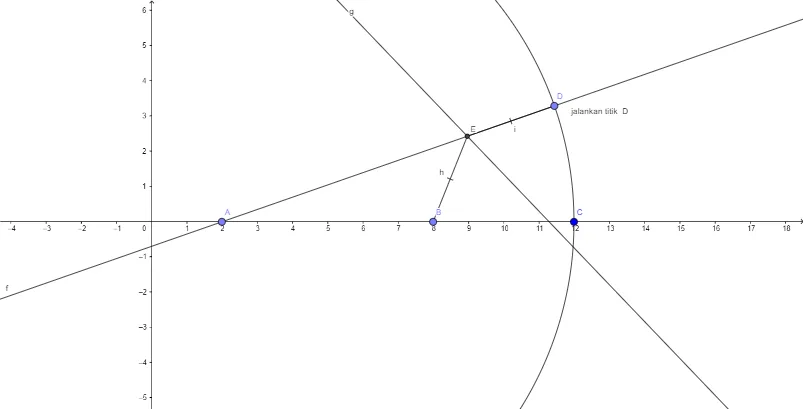
This example demonstrates how an ellipse (as a point set, i.e., a locus) can be constructed and visualized by enforcing specific geometric constraints. It highlights the locus idea: points satisfying a chosen relationship between distances/geometry-derived conditions form a recognizable ellipse-shaped curve. Key concepts include locus/set-based reasoning, the geometric characterization of an ellipse, and the role of special points and symmetry in forming the required constraints. Construction-wise, it builds fundamental objects with GeoGebra commands Point, Circle, Line, LineBisector, Intersect, and Segment. Points such as A, B, C (and derived objects like c, D, E, h, i, plus the auxiliary text label) are combined with circles and lines; LineBisector provides symmetry or angle/direction constraints, while Intersect locates critical points used to trace the locus. Suitable for secondary school through early undergraduate geometry/analytic geometry instruction, especially for visualizing ellipse properties and learning geometric construction modeling.
GeoGebra Commands & Parameters
Point(xAxis) → APoint(xAxis) → BCircle(A, C) → cPoint(c) → DLine(A, D) → fLineBisector(D, B) → gIntersect(f, g) → ESegment(E, B) → hSegment(E, D) → i
AI Drawing Prompt Reference
Draw an ellipse. The ellipse is formed by two circles and a line. The circles' centers lie on the ellipse, and the line intersects the circles to define the boundary. The ellipse has symmetry, and the construction involves drawing circles first, then the line, and finally determining the intersection points.
The prompt above was compiled from the original drawing commands and is for reference only.