
Linearity 3 Demo
Loading the math board and drawing, please wait…
In collections
Exploring Linearity
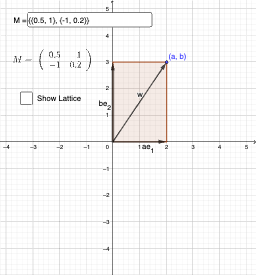
This example demonstrates the graphical representation of linear relationships and the application of conditional probability. It involves core mathematical concepts such as equations, conditional probability, piecewise functions, parabolas, and normal distributions. The construction utilizes GeoGebra commands like Vector, Textfield, Polygon, Sequence, Union, and If. It is suitable for high school and above students learning about linear functions, probability statistics, and complex function graphing.
GeoGebra Commands & Parameters
Vector(A, B) → uVector(A, C) → vTextfield(M) → InputBox1Polygon(A, B, B + C, C) → q1, f, g, h, iPolygon((M * A), (M * B), (M * (B + C)), (M * C)) → q2, j, k, l, mSequence(Line[(M * ((-c), t)), (M * (c, t))], t, (-c), c) → Mlist1Sequence(Line[((-c), t), (c, t)], t, (-c), c) → list1Sequence(Line[(M * (t, (-c))), (M * (t, c))], t, (-c), c) → Mlist2Sequence(Line[(t, (-c)), (t, c)], t, (-c), c) → list2Union(Mlist1, Mlist2) → latticeIf(Determinant[M] ≠ 0, lattice) → showLattice
AI Drawing Prompt Reference
Draw a graph with linear relationships, conditional probability, and piecewise functions. Start by drawing vectors u and v, then create a text input box. Draw a quadrilateral including a piecewise function and a parabola. Apply scaling transformation to create another quadrilateral and piecewise function. Draw a series of parallel lines to form a grid, and finally display the grid based on the determinant value.
The prompt above was compiled from the original drawing commands and is for reference only.