
Linear Combinations of Two Vectors in 2D
Loading the math board and drawing, please wait…
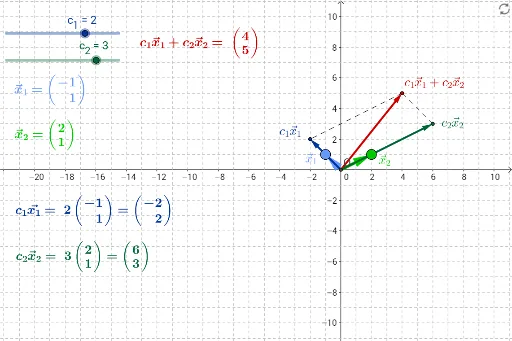
This example demonstrates the linear combinations of two vectors in 2D space. Key mathematical concepts include vector addition and scalar multiplication. Using GeoGebra commands such as Intersect, Line, Vector, and Segment, the result of linear combinations can be visually illustrated. Suitable for high school mathematics education and learning vector-related knowledge.
GeoGebra Commands & Parameters
Intersect(xAxis, yAxis) → OLine(O, x_1) → aLine(O, x_2) → bVector(O, x_1) → x1Vector(O, x_2) → x2Segment(c2x_2, LinComb) → cSegment(LinComb, c1x_1) → dVector(O, LinComb) → LinComboVector(O, c1x_1) → c1x1Vector(O, c2x_2) → c2x2
AI Drawing Prompt Reference
In a 2D coordinate system, draw two vectors starting from the origin, each pointing to a distinct point. From the origin, extend two lines along the directions of these vectors. Then, scale each vector by a scalar coefficient, creating two new vectors from the origin. Connect the endpoints of these scaled vectors with line segments to form a broken line, and draw a segment from the final endpoint back to the origin to represent the linear combination vector. Also, connect the endpoints of the scaled vectors to the endpoint of the combination vector to illustrate the parallelogram law of vector addition.
The prompt above was compiled from the original drawing commands and is for reference only.