
Linear Combination by Malin Christersson
Loading the math board and drawing, please wait…
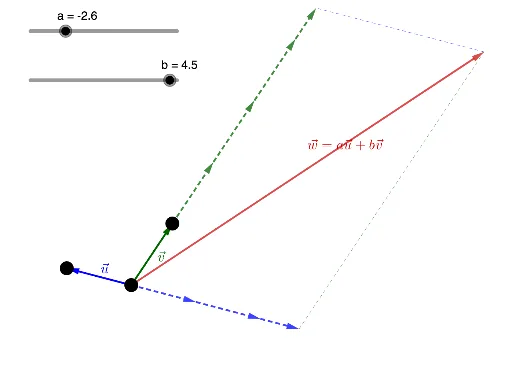
This example demonstrates the concept of linear combination. It involves core mathematical concepts such as vectors and sequences. Using GeoGebra commands like Vector, Sequence, and Segment, the linear combination is constructed. Suitable for high school mathematics education and learning.
GeoGebra Commands & Parameters
Vector(A, B) → uVector(A, C) → vIf(a > 0, floor(a), abs(ceil(a))) → anrIf(b > 0, floor(b), abs(ceil(b))) → bnrSequence(Vector[If[a > 0, Vector[A + (i * u), A + ((i + 1) * u)], Vector[A - (i * u), A - ((i + 1) * u)]]], i, 0, anr - 1) → L_1Sequence(Vector[If[b > 0, Vector[A + (i * v), A + ((i + 1) * v)], Vector[A - (i * v), A - ((i + 1) * v)]]], i, 0, bnr - 1) → L_2If(a > 0, Vector[A + (anr * u), D], Vector[A - (anr * u), D]) → alastIf(b > 0, Vector[A + (bnr * v), E], Vector[A - (bnr * v), E]) → blastVector(A, A + (a * u) + (b * v)) → wSegment(D, F) → fSegment(F, E) → g
AI Drawing Prompt Reference
Draw a linear combination graphic of vector u from A to B and vector v from A to C. First, draw vectors u and v, then based on the values of a and b, draw a series of vectors to form sequences L1 and L2. Next, draw vector w, which is the linear combination of a*u+b*v. Finally, connect points D and F, and points F and E to form line segments f and g.
The prompt above was compiled from the original drawing commands and is for reference only.