
Line through Two Points: Vector and Intersection Construction
Loading the math board and drawing, please wait…
In collections
geometriadinamica.es
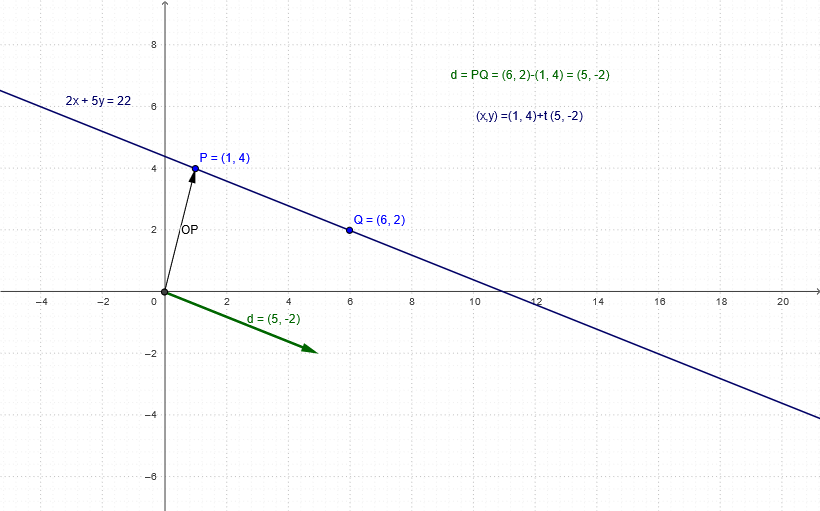
This example demonstrates how to construct a straight line passing through two given points in a 2D plane, using vectors and intersection tools to reveal relationships with axes or other geometric elements. Core mathematical concepts include coordinate geometry of lines, collinearity of vectors, and point-line position relations. Construction highlights: GeoGebra commands such as Intersect for finding intersection points, Vector for creating direction vectors, and Line for generating the line; objects include points P, O, Q, vector OP, line d, and auxiliary triangles T4 and T1. Suitable for upper middle school or high school students to understand basic line construction, and for teachers to illustrate the connection between vectors and lines in classroom demonstrations.
GeoGebra Commands & Parameters
Intersect(xAxis, yAxis) → OVector(O, P) → OPVector(O, Q - P) → dLine(P, Q) → a
AI Drawing Prompt Reference
In a 2D Cartesian coordinate plane, first identify the intersection point of the x-axis and y-axis as the origin O. Then select two distinct points P and Q anywhere on the plane, draw a vector from the origin to point P, and create another vector from P to Q representing the direction. Finally, draw a straight line passing through both points P and Q to visualize the relationship between the line and the vectors, using auxiliary geometric figures to demonstrate the collinearity and positional connections between points, vectors, and the line.
The prompt above was compiled from the original drawing commands and is for reference only.