
Line Intercepts Practice for Mobile Devices
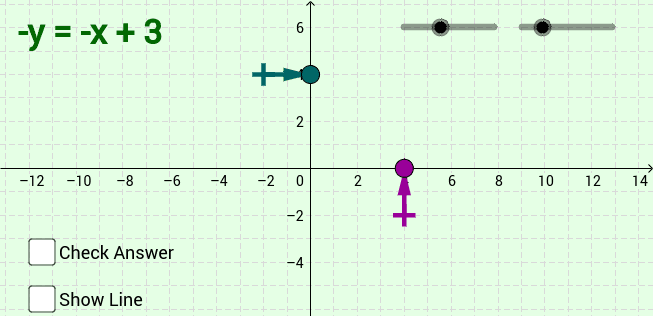
Loading the math board and drawing, please wait…
This example demonstrates a randomly generated line on mobile devices, asking learners to find its x‑intercept and y‑intercept. Core mathematical concepts include the equation of a line, intercept form, and the relationship between points and lines in coordinate geometry. Construction uses GeoGebra commands Segment, Point, LCM, If, Vector and creates objects such as dis, g, f, bb, aa, a, AA, A, b, BB, B, m, texta, textb, a_p, b_p, m_s, m_a, m_b, textam, textbm, textLine, c, d, u, v, e to build the line, label intercepts, and implement random generation with conditional logic. It is suitable for middle‑school algebra and coordinate geometry (grades 7‑9) and can also serve as a review or self‑practice tool for high‑school students.
GeoGebra Commands & Parameters
Segment((-12, -dis), (12, -dis)) → gSegment((-dis, -6), (-dis, 6)) → fPoint(f) → AAPoint(g) → BBLCM(abs(a), abs(b)) → mIf(y(A) ≟ a, "Yes!", "") → textaIf(x(B) ≟ b, "Yes!", "") → textbIf(a < 0, -m, m) → m_sIf(m / a ≟ 1, "", If[m / a ≟ -1, "-", Text[m / a]]) → m_aIf(m / b ≟ 1, "-", If[m / b ≟ -1, "", Text[(-m) / b]]) → m_bIf(y(A) ≟ -a, "Watch your signs!", "") → textamIf(x(B) ≟ -b, "Watch your signs!", "") → textbmVector(AA, A) → uVector(BB, B) → v
AI Drawing Prompt Reference
Draw a randomly generated line in a coordinate system, marking its x and y intercepts. The line should intersect the axes at specific points, with the coordinates of the intercepts displayed. Use vectors to connect the intercept points to corresponding points on the line, and add text prompts that confirm correct inputs or warn about sign errors. The graphic should illustrate the line, intercepts, vectors, and related mathematical relationships, suitable for middle-school coordinate geometry education.
The prompt above was compiled from the original drawing commands and is for reference only.