
LEGO Multiplication
Loading the math board and drawing, please wait…
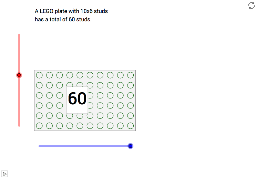
This example demonstrates multiplication by adjusting the height and width of LEGO plates. The core mathematical concept involved is multiplication. The construction involves using slider animation to adjust the size of the plates and calculating the total number of studs through geometric construction. Suitable for upper elementary or middle school students to learn multiplication.
GeoGebra Commands & Parameters
Sequence(10) → list1Sequence(Sequence[Circle[(i, j), 0.3], i, 1, m], j, 1, n) → list2Polygon((0.5, 0.5), (0, n) + 0.5, (m, n) + 0.5, (m, 0) + 0.5) → poly1, a, b, c, dMidpoint(b) → BMidpoint(B, C) → A
AI Drawing Prompt Reference
Draw a LEGO multiplication demonstration. Start with a rectangular grid of small circles evenly spaced, representing studs on LEGO plates. The number of rows and columns is adjustable via sliders. Then outline the entire grid with a bold rectangle border, enclosing the grid. Mark a point at the midpoint of the right side of the rectangle, then place another point at the midpoint between that point and the top-right corner, with a label showing the multiplication result. The overall design is clean, emphasizing the arrangement and counting relationship.
The prompt above was compiled from the original drawing commands and is for reference only.