
Law of Sines: Side Length Calculation in a Triangle
Loading the math board and drawing, please wait…
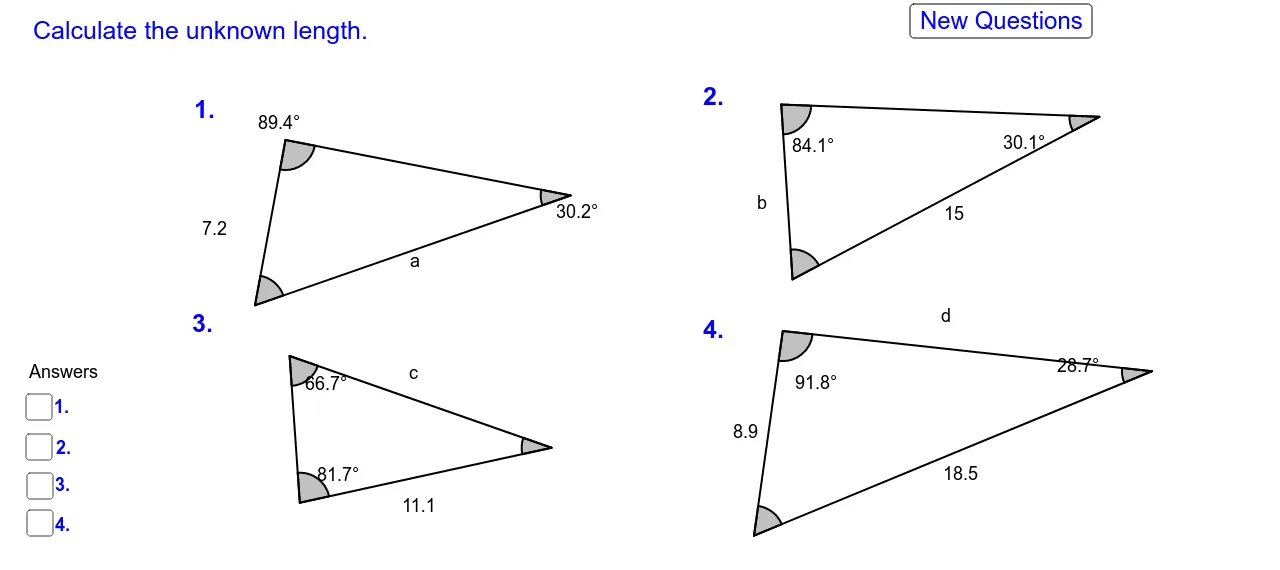
① This GeoGebra example dynamically demonstrates the Law of Sines, showing that the ratio of each side to the sine of its opposite angle is constant in a triangle, and uses this relationship to calculate unknown side lengths. ② Core mathematical concepts include the sine rule, triangle angle sum, side-angle correspondence, and trigonometric functions. ③ Construction details: The example uses GeoGebra commands such as Segment, Angle, and Distance to build the triangle and label its sides and angles, involving multiple objects (points like A_1, B_1, C_1; sides a, b, c; angles α, β, γ) and text objects (text2_1, text3_1, etc.) to display calculations and results, possibly with sliders for interactive exploration. ④ Suitable for high school or early college students learning trigonometry and geometry, and for teachers to illustrate the derivation and application of the sine rule in classroom settings.
GeoGebra Commands & Parameters
Segment(A_1, B_1) → a_1Segment(B_1, C_1) → b_1Segment(C_1, A_1) → aSegment(G_1, H_1) → g_1Segment(H_1, I_1) → h_1Segment(I_1, G_1) → i_1Angle(C_1, B_1, A_1) → α_1Angle(H_1, I_1, G_1) → β_1Angle(I_1, G_1, H_1) → γ_1Distance(h_1, b_1) → p_1Segment(J_1, K_1) → j_2Segment(L_1, K_1) → k_2Segment(J_1, L_1) → l_2Angle(J_1, L_1, K_1) → ε_1Distance(j_2, l_2) → m_2Segment(J_2, K_2) → j_3Segment(L_2, K_2) → k_3Segment(J_2, L_2) → l_3Angle(J_2, L_2, K_2) → ε_2Distance(j_3, l_3) → m_3Angle(B_1, A_1, C_1) → ζ_1Angle(A_1, C_1, B_1) → η_1Angle(L_2, K_2, J_2) → ξ_1Angle(K_2, J_2, L_2) → ο_1Angle(L_1, K_1, J_1) → ρ_1Angle(K_1, J_1, L_1) → σ_1Angle(G_1, H_1, I_1) → τ_1
AI Drawing Prompt Reference
Draw a triangle with labeled vertices and sides, marking the angles at each vertex. Use sliders to dynamically adjust the triangle's size and angles, and display the ratio of each side to the sine of its opposite angle, showing that this ratio remains constant. Additionally, draw three auxiliary triangles to illustrate the correspondence of sides and angles, labeling their dimensions and angles.
The prompt above was compiled from the original drawing commands and is for reference only.