
Law of Sines Demonstration by Norm Prokup
Loading the math board and drawing, please wait…
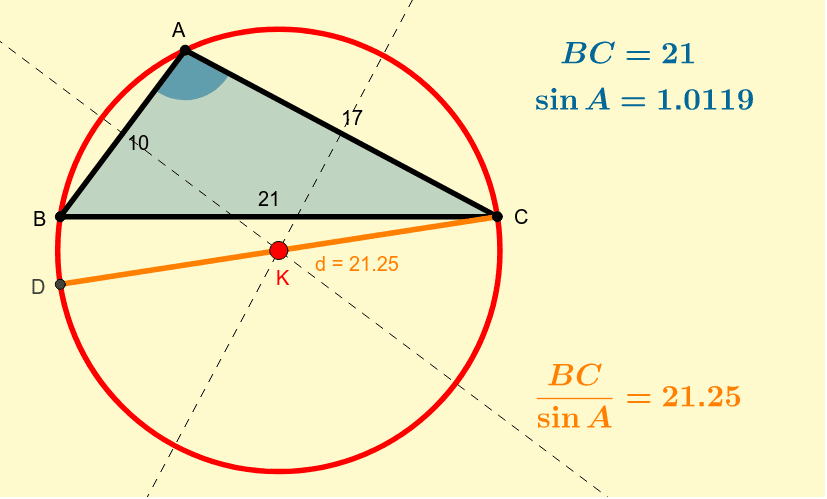
This example dynamically demonstrates the relationship between sides and angles in a triangle, visually illustrating the Law of Sines. The core math concepts involved are the Law of Sines and geometric properties of triangles. Construction highlights include using GeoGebra commands such as Circle, Intersect, Segment, LineBisector, Line, Angle, and Polygon to build the figure. It is suitable for high school mathematics teaching to help students understand and memorize the Law of Sines.
GeoGebra Commands & Parameters
Circle(B, 10) → cCircle(C, 17) → c_1Intersect(c, c_1, 1) → ASegment(B, A) → fSegment(C, A) → gSegment(B, C) → hCircle(B, A, C) → eLineBisector(f) → iLineBisector(g) → jIntersect(i, j) → KLine(K, C) → kIntersect(e, k, 2) → DAngle(B, A, C) → αPolygon(A, B, C) → poly1, AB, BC, ACSegment(D, C) → d
AI Drawing Prompt Reference
Draw a triangle with three vertices labeled. Construct two circles centered at two vertices that intersect at the third vertex. Connect the vertices to form the triangle. Draw the angle bisectors of two sides, which intersect at a point. From this point, draw a perpendicular line to the third side, meeting the circumcircle at a point. Label all sides, angles, and the circumcircle.
The prompt above was compiled from the original drawing commands and is for reference only.