
Law of Sines Demonstration and Exploration
Loading the math board and drawing, please wait…
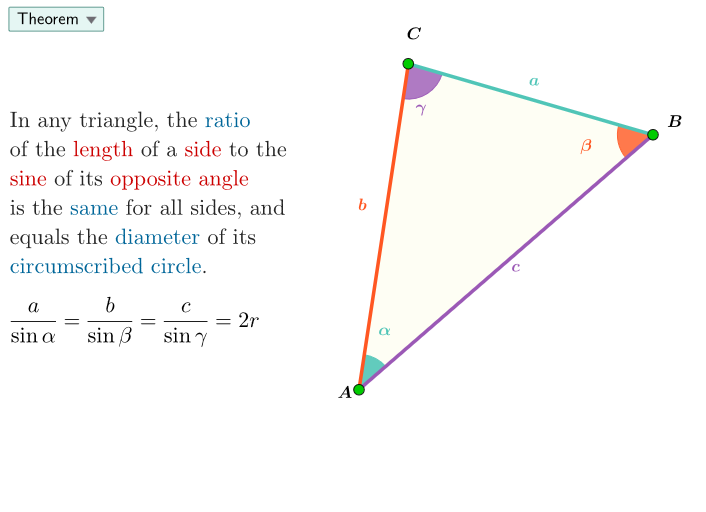
This example demonstrates the Law of Sines in arbitrary triangles, showing the constant ratio of side lengths to their corresponding sine values. It involves core concepts like the Law of Sines, triangle geometry, and trigonometric functions. Construction highlights include commands like Circle, PointIn, Point, Tangent, Polygon, Angle, Segment, and SelectedIndex. Suitable for high school mathematics teaching or self-study to enhance understanding and application of the Law of Sines.
GeoGebra Commands & Parameters
Circle(O, 6.1) → peepPointIn(peep) → A_1Circle(O, A_1) → cPoint(c) → CPoint(c) → APoint(c) → BTangent(C, c) → f,Tangent(A, c) → d,Polygon(A, B, C) → poli1, c_1, a_1, b_1Angle(B, A, C) → αAngle(C, B, A) → βAngle(A, C, B) → γSegment(O, A_1) → rSelectedIndex(scelte) → is
AI Drawing Prompt Reference
Draw a circle with center O and radius about 6.1. Choose a point A1 on the circle and draw the radius segment from O to A1 (r). Select three points A, B, and C on the same circle to form a triangle. Construct tangents to the circle from vertex C and from vertex A, shown as two tangent lines f and d. Connect A, B, C to form the triangle and label its three interior angles: angle BAC as α, angle CBA as β, and angle ACB as γ.
The prompt above was compiled from the original drawing commands and is for reference only.