
Law of Cosines for Obtuse Triangle
Loading the math board and drawing, please wait…
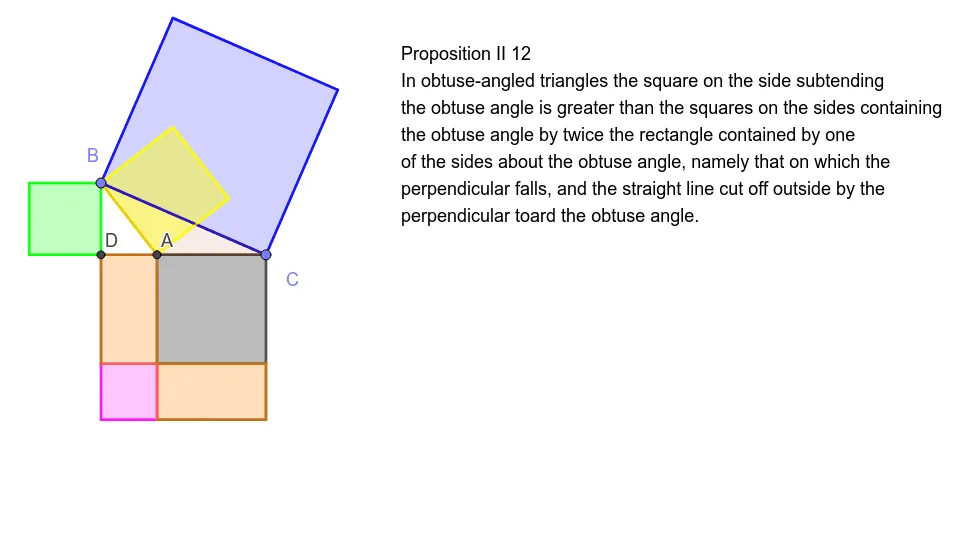
This example demonstrates the Law of Cosines in an obtuse triangle. It visually exhibits the geometric significance of the Law of Cosines for non-right triangles through dynamic construction of an obtuse triangle and related segments. Key concepts include the Law of Cosines formula, side-angle relationships in obtuse triangles, and vector projection. GeoGebra commands like Point, Ray, Polygon, PointIn, OrthogonalLine, Intersect, and Segment are used in the construction, making it suitable for high school geometry and trigonometry teaching to deepen students' understanding and application of the Law of Cosines.
GeoGebra Commands & Parameters
Point({0, 0}) → APoint({0, 1}) → B_1Point({1, 0}) → C_1Ray(A, C_1) → fPoint({-10, 0}) → D_1Point({-10, 10}) → EPoint({0, 10}) → FPolygon(A, D_1, E, F) → q1, a, d, e, f_1PointIn(q1) → BPoint(f) → CPolygon(A, B, C) → t1, h, a_1, gPolygon(B, C, 4) → poly1, i, j, k, l, I, JPolygon(B, A, 4) → poly2, m, n, p, q, K, LOrthogonalLine(B, f) → rIntersect(r, xAxis) → DPolygon(D, B, 4) → poly3, s, t, b, c, N, OPolygon(C, D, 4) → poly4, g_1, h_1, i_1, j_1, P, QPolygon(C, A, 4) → poly5, k_1, l_1, m_1, n_1, R, SOrthogonalLine(A, f) → p_1Intersect(p_1, i_1) → TPolygon(P, T, 4) → poly6, q_1, r_1, s_1, t_1, U, VSegment(A, D) → b_1Segment(D, V) → c_1Segment(T, Q) → d_1Segment(Q, S) → e_1Polygon(V, R, A, D) → q2, v, r_2, a_2, m_2Polygon(R, T, Q, S) → q3, r_3, t_2, q_2, s_2
AI Drawing Prompt Reference
Draw a visual demonstration of the Law of Cosines for an obtuse triangle, showing key points, sides, and angles. Dynamically construct the triangle and related segments, including perpendicular lines, projections, and intersection points, to illustrate the geometric significance of the Law of Cosines in non-right triangles for high school geometry and trigonometry teaching.
The prompt above was compiled from the original drawing commands and is for reference only.