
Lateral Surface Area of a Cone
Loading the math board and drawing, please wait…
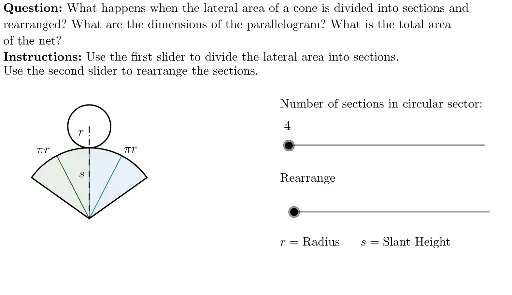
This example demonstrates the calculation of the lateral surface area of a cone. Key math concepts include the geometric properties of cones, lateral surface area formulas, and integral calculus applications. GeoGebra commands and objects used in construction are Min, Point, Sequence, Max, Segment, Circle, Rotate, CircleSector, Sort, Translate, Vector, If, Line, Intersect, Polygon, LaTeX. Suitable for high school students learning solid geometry and calculus concepts.
GeoGebra Commands & Parameters
Min(Rearrange / 2, 1) → kPoint(yAxis) → OSequence(If[k < 1, (((cl * sin((i * α))) * cos((i * α)) / sin(α)), (-(gap + ((cl * sin((i * α))) * sin((i * α)) / sin(α))))), ((cl * i), (-gap))], i, 0, nCones / 2) → cMovingPosInitializeMax(Rearrange / 2 - 1, 0) → k'Segment(H, (x(H), 0)) → RadiusDisplayCircle((0, Radius), Radius) → c_1Rotate(O, cAngle / 2, cMid) → cLeftRotate(O, ((-cAngle)) / 2, cMid) → cRightCircleSector(cMid, cRight, cLeft) → cSectorSort(Union[Sequence[Mirror[Element[cMovingPosInitialize, i], yAxis], i, 2, nCones / 2 + 1], cMovingPosInitialize]) → cMovingPosSequence(Vector[Element[cMovingPos, i + 1] - Element[cMovingPos, i]], i, 1, nCones) → cL_VSequence(Vector[(-UnitOrthogonalVector[Element[cL_V, i]])], i, 1, nCones) → cL_pSequence(Element[cMovingPos, i] + (0.5 * Element[cL_V, i]) + (ctHeight * Element[cL_p, i]), i, 1, nCones) → cL_cSequence(Rotate[cRight, (i * cAngle / nCones), cMid], i, 0, nCones) → cLstartPosSequence(CircleSector[Element[cL_c, i], Element[cMovingPos, i + 1], Element[cMovingPos, i]], i, 1, nCones / 2) → cmSegmentASequence(CircleSector[Element[cL_c, i], Element[cMovingPos, i + 1], Element[cMovingPos, i]], i, nCones / 2 + 1, nCones) → cmSegmentBTranslate(Element[cMovingPos, nCones / 2 + 1], (Min[(2 * k'), 1] * (Element[cL_c, 2] - Element[cMovingPos, 2]))) → cstage2LocationVector(Rotate[(-1, 0), ((k' * 180))°]) → cstage2DirectionIf(¬stage1, Zip[Rotate[B, ((k' * 180))°, cstage2Location], B, Zip[Translate[A, cStage2Translate], A, cmSegmentA]]) → cmSegmentA2Line(O + (0, Radius), xAxis) → q1TopSideLine(O - (0, ctHeight + gap - SlantHeight), xAxis) → q2TopSideLine((0, (-gap) - SlantHeight), xAxis) → q2BottomSideIntersect(Line[Q2topleft, cStage2Translate], q2BottomSide) → Q2bottomleftIntersect(Line[Q2topright, cStage2Translate], q2BottomSide) → Q2bottomrightPolygon(Q2topleft, Q2bottomleft, Q2bottomright, Q2topright) → Q2, q2topleft, q2bottomleft, q2bottomright, q2toprightSegment(O, cMid) → SlantDisplayLaTeX("\text{\textbf{Instructions: }Use the first slider to divide the lateral area into sections. \\Use the second slider to rearrange the sections.") → SpecInstrucIf(k < 1, (-2, 0) + (0, (k * 0.5)), Rotate[Translate[(-2, 1), Vector[(cStage2Translate * 1.3)]], ((k' * 45))°, (1, 0)]) → ALaTeX("\text{\textbf{Question: }What happens when the lateral area of a cone is divided into sections and\\rearranged? What are the dimensions of the parallelogram? What is the total area \\of the net?}") → MainInstruc
AI Drawing Prompt Reference
Draw a cone's lateral surface area展开图, showing the calculation of lateral surface area. The diagram includes a rotated and unrolled cone shape made of multiple sectors and triangles, controlled by sliders for sector count and position. Connect the center point to the cone's vertex to display the slant height. The bottom shows the unrolled lateral shape with labeled dimensions. Left side has text instructions, right side has a question about the shape's properties.
The prompt above was compiled from the original drawing commands and is for reference only.