
Kite with Fixed Side Lengths
Loading the math board and drawing, please wait…
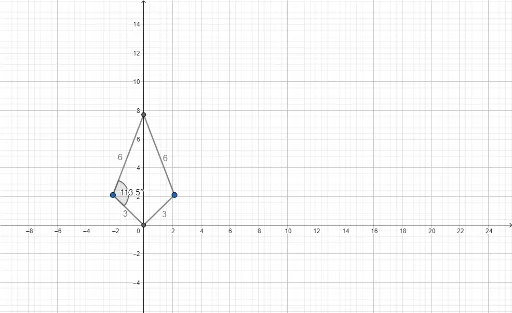
This example demonstrates how to use GeoGebra to construct a kite with fixed side lengths. Key mathematical concepts include the properties of a kite and geometric construction. The commands used include Intersect, Point, Segment, Circle, Mirror, and Angle. Suitable for middle school and above students or teachers.
GeoGebra Commands & Parameters
Intersect(xAxis, yAxis) → APoint(Circle[A, 3]) → BSegment(A, B) → fPoint(Circle[B, 6]) → CSegment(B, C) → gCircle(B, 6) → cIntersect(c, yAxis) → D, ESegment(B, E) → hMirror(B, yAxis) → B'Segment(B', E) → iSegment(B', A) → jAngle(E, B, A) → α
AI Drawing Prompt Reference
Draw a kite with fixed side lengths. Start by drawing a horizontal segment AB with a length of 3 from the origin. Then, draw a circle centered at B with a radius of 6, intersecting the y-axis at point C and draw segment BC. Next, draw another circle centered at B with a radius of 6, intersecting the y-axis at point D and draw segment BE. Reflect point B across the y-axis to get B', then draw segments B'E and B'A. Finally, measure the angle ∠EBA.
The prompt above was compiled from the original drawing commands and is for reference only.