
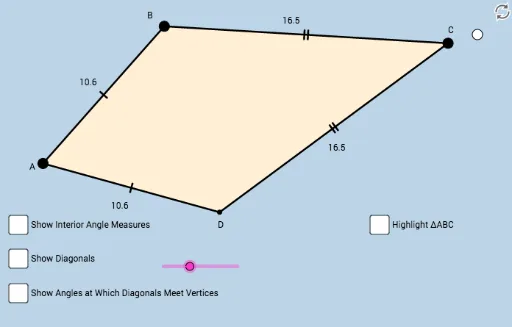
Kite Template: Step-by-Step Investigation
Loading the math board and drawing, please wait…
This example demonstrates the geometric construction and properties of a kite, involving core math concepts like geometric construction, angle relationships, and symmetry. It uses GeoGebra commands such as Rotate, Angle, Ray, Mirror, Point, Circle, Segment, Polygon, Intersect, CircleSector, and Midpoint to build the kite step-by-step and explore its characteristics. Suitable for middle school and above students for geometry learning and exploration activities.
GeoGebra Commands & Parameters
Rotate(B_1, α, A) → B'Angle(B_1, A, B') → βRay(A, B') → fRay(A, B_1) → gMirror(A, g) → A'Mirror(B', g) → B''Ray(A', B'') → f'Point(g) → CPoint(f) → BCircle(B, C) → cSegment(B, C) → hMirror(B, g) → DSegment(C, D) → iSegment(A, C) → jPolygon(A, D, C, B) → poly1, a, d', c_1, dSegment(A, B) → kSegment(A, D) → lCircle(A, (0.2 * k)) → eIntersect(e, k, 1) → EIntersect(e, l, 1) → FCircleSector(A, F, E) → pSegment(A, C) → mSegment(B, D) → nIntersect(m, n) → GAngle(B, G, A) → γSegment(A, G) → qSegment(G, C) → rSegment(B, G) → sSegment(G, D) → tAngle(G, A, B) → δAngle(D, A, G) → εAngle(G, C, D) → ζAngle(B, C, G) → ηAngle(A, B, G) → θAngle(G, B, C) → ιAngle(G, D, A) → κAngle(C, D, G) → λSegment(C, A) → bAngle(B, C, D) → μAngle(A, B, C) → νAngle(C, D, A) → ξAngle(C, A, B) → οAngle(D, A, C) → ρSegment(B, D) → f_1Midpoint(f_1) → HSegment(C, H) → g_1Angle(C, H, D) → σSegment(B, H) → h_1Segment(H, D) → i_1Angle(B, C, A) → τAngle(A, C, D) → υSegment(A, C) → j_1Angle(A, B, C) → ϕAngle(C, D, A) → χAngle(D, A, B) → ψAngle(B, C, D) → ωPolygon(A, B, C) → poly2, c_2, a_1, b_1Segment(A, C) → k_1Mirror(A, k_1) → A'_1Mirror(B, k_1) → B'_1Mirror(C, k_1) → C'Polygon(A'_1, B'_1, C') → poly2', c', a'_1, b'_1